

Whether you are a seasoned pro or just starting out, knowing what YouTube Studio is is the foundation of channel growth. It is the mission control center where you upload, analyze, and optimize your content.
In 2026, YouTube Studio also surfaces AI-powered insights, audience research data, and Shorts performance metrics — making it more essential than ever for data-driven creators.
To fill your studio with high-quality content that actually converts, many creators use Van Gogh Studio to generate publication-ready videos that stand out in the competitive algorithm.
Quick Verdict
YouTube Studio is your all-in-one creator dashboard for uploads, metadata, analytics, and monetization. In 2026, focus on three tabs: Dashboard (daily performance), Content (visibility and editing), and Analytics (retention and audience research). Pair Studio insights with the YouTube analytics guide and track milestones using the YouTube subscriber goal tracker.
What is YouTube Studio
YouTube Studio is the backend platform designed to give creators a full view of their channel. It provides tools for video editing, comment management, monetization, and audience research.
It is not just a storage space — it is a data-driven environment that helps you understand your audience's behavior. Before diving into the technical details, understand that YouTube Studio exists to help you make smarter publishing decisions.
Where is YouTube Studio and How to Access It
Finding YouTube Studio is the first step toward professional channel management. On a desktop browser, click your profile picture in the top-right corner of YouTube and select YouTube Studio. Alternatively, go directly to studio.youtube.com.

For creators on the go, the YouTube Studio app is available for both iOS and Android. The mobile version lets you monitor analytics, respond to comments, and make quick metadata changes. For deep customization and advanced video editing, the desktop version remains the most powerful option.
How to Use YouTube Studio to Manage Your Channel
YouTube Studio is divided into several key sections, each serving a unique purpose in your content strategy. Navigating these tabs efficiently is the secret to maintaining a consistent upload schedule.
The dashboard for daily snapshots
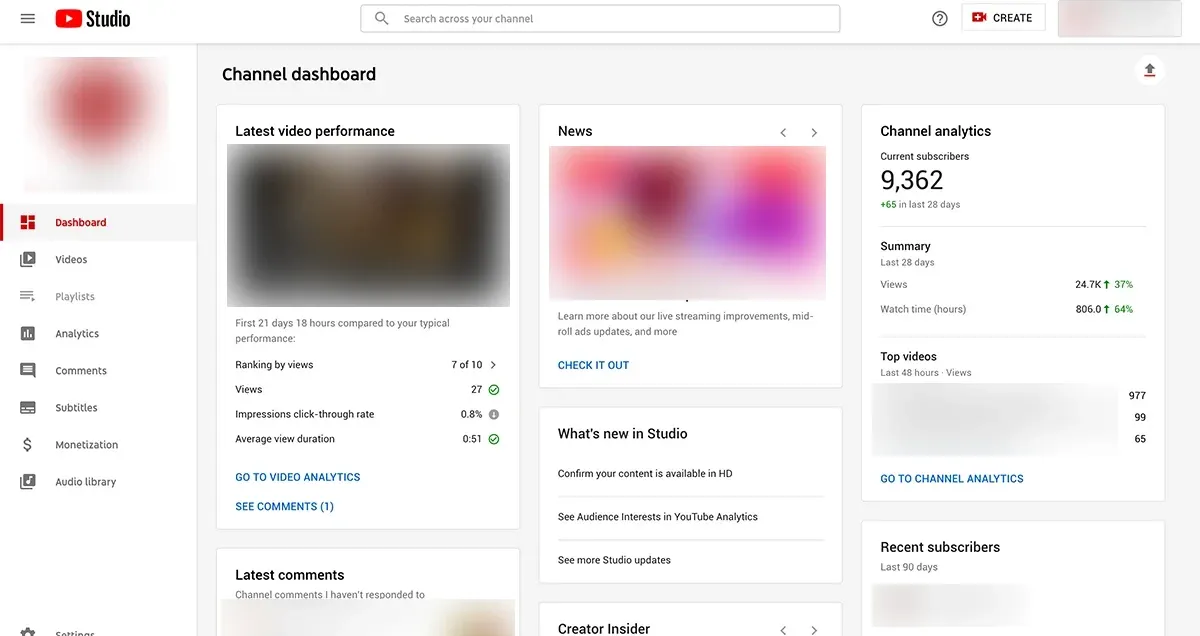
The dashboard provides a high-level view of your channel's recent performance. It acts as a performance mirror, showing how your latest upload's views compare to your typical reach.
If you notice a dip in engagement, it might be time to refresh your content style. Use the YouTube growth strategy generator to identify what to test next.
Managing visibility and the unlisted meaning
When you set a video to Unlisted, it is hidden from search and your channel page but accessible via a direct link. In the Content tab, you manage privacy settings.
A frequent question among beginners: what does unlisted mean on YouTube? Unlisted videos do not appear in recommendations or search — use them for early feedback, client previews, or private sharing before going public.
How to Edit a Video in YouTube Studio
YouTube provides a built-in editor that lets you trim sections, blur sensitive information, and insert end screens. These tools are excellent for quick fixes but can be limiting for creators who want high-impact visuals.
To bypass the limitations of basic editing, many creators use Van Gogh Studio's video editor to transform raw footage with text prompts before uploading. This allows you to add cinematic transitions and professional-grade effects that the standard Studio editor cannot provide.
How to Track Your Channel Performance in YouTube Studio
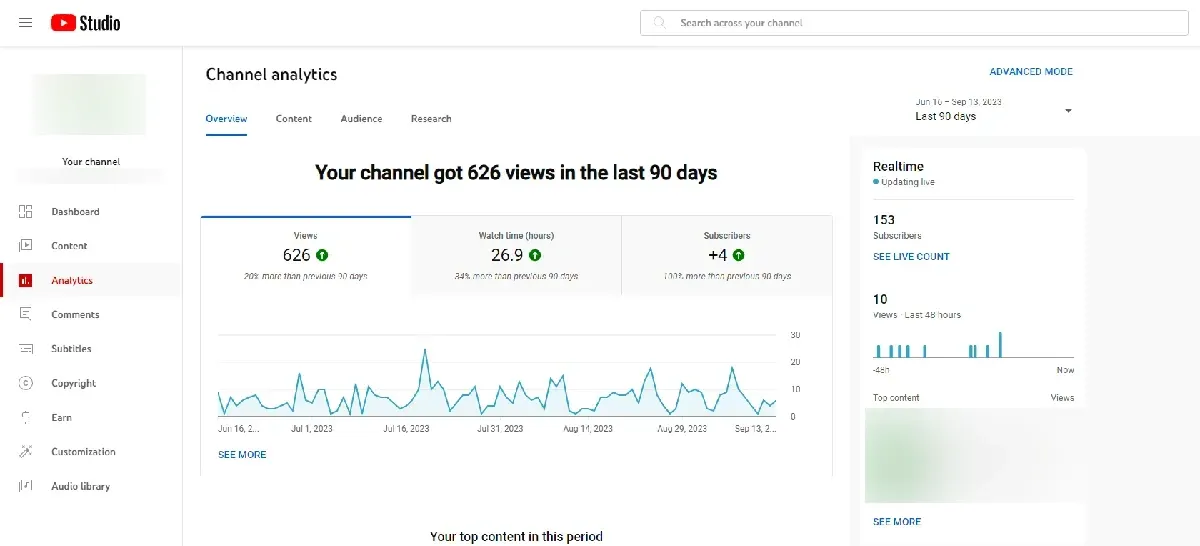
The Analytics tab in YouTube Studio offers deep insights into who is watching. Data is the lifeblood of growth. The Research tab is another goldmine — it shows you what your audience is searching for on YouTube.
By monitoring metrics like average view duration and audience retention, you can pinpoint exactly when viewers click away. For a structured walkthrough of these metrics, try the YouTube analytics guide.
Customize Your Channel to Boost Your Views
The Customization tab is your digital storefront. Here, you can set a channel trailer for non-subscribers and a featured video for returning fans. A professional-looking channel page can increase your subscriber conversion rate by ensuring your brand identity is clear and consistent.
Design eye-catching channel art and thumbnails with the video thumbnail maker. You can also find free music in YouTube's Audio Library — using copyrighted music can lead to strikes on your account.
Reach More People by Adding Subtitles
YouTube's auto-captioning is a start, but manual review ensures your message is not lost in translation. Accessibility is a key ranking factor in 2026.
By adding subtitles in the Subtitles tab, you make your content available to a global audience and those who watch with the sound off. Expanding your reach globally is one of the fastest ways to scale your analytics in YouTube Studio.
Scaling Production with Van Gogh Studio
The biggest challenge in YouTube Studio is maintaining consistency — this is where many creators burn out. Van Gogh Studio Agent solves this by creating publication-ready, full-length videos from a simple prompt.
To keep your studio active without spending 24 hours a day editing, leverage these specialized tools:
- Van Gogh Studio Agent: Turn ideas into full videos via conversational chat.
- YouTube intro generator: Create branded openings in seconds.
- YouTube idea generator: Never run out of upload topics.
Final Checklist for YouTube Studio Success
To make the most of YouTube Studio management, follow this checklist for every upload:
- Optimize Metadata: Use relevant keywords in your title and the first two lines of your description.
- Check Visibility: Double-check unlisted vs. public before hitting publish.
- Add End Screens: Direct viewers to another relevant video to increase session time.
- Review Subtitles: Ensure your captions are accurate to reach a global audience.
- Analyze and Iterate: Check your analytics 48 hours after posting to see where to improve.
Track subscriber milestones with the YouTube subscriber goal tracker and plan your next moves with the YouTube growth strategy generator.
Conclusion
From knowing where YouTube Studio lives to tracking complex analytics, these tools empower you to steer your channel toward growth. Mastering YouTube Studio is essential for any creator aiming for long-term success in 2026.
Start optimizing your studio today and watch your channel reach new heights. By combining these technical insights with the production power of Van Gogh Studio, you can transform your creative vision into a thriving digital business.
You might also like
How to Grow on YouTube in 2026
Eight proven strategies — audience targeting, thumbnails, SEO, Shorts, hooks, and brand packaging.
How to See Your YouTube Subscribers
Find your recent subscriber list on desktop and mobile, and turn that data into growth strategy.
YouTube SEO Guide: Optimize Videos for More Views
Titles, descriptions, tags, playlists, and captions — the metadata playbook for search visibility.
How to Make a YouTube Viewer Avatar That Grows Your Channel
Build a fictional audience profile from analytics data to guide content and packaging decisions.
6 YouTube CTR Tips to Get More Clicks and Views
Improve click-through rates with better thumbnails, titles, and A/B testing in 2026.
Best Time to Post YouTube Videos
Data-driven timing strategies to maximize initial velocity and algorithm testing windows.
Create AI videos free
Try Van Gogh Studio free — text-to-video, image-to-video, and 300+ models in one place. Free credits on signup, no credit card required.
Try Free Video Generator


