

In 2026, YouTube's algorithm prioritizes viewer satisfaction over raw clicks. A thumbnail that earns clicks but leads to immediate drop-offs will get suppressed fast.
Yet thumbnails still dictate your click-through rate (CTR) — and CTR is the first signal YouTube tests on every new upload. Without clicks, the algorithm never gets a chance to measure whether your content satisfies viewers.
The winning formula: compelling thumbnails plus content that delivers on the promise. Metadata and packaging are supporting signals; retention and session contribution are primary.
This guide covers eight proven thumbnail types, free design tools, and links to related YouTube growth guides from Van Gogh Studio.
Quick Verdict
The best YouTube thumbnails in 2026 combine a proven visual format with content that delivers on the click. Pick a style that fits your niche — questions, before-after, quotes, products, stats, drama, vlog, or landscape — then test with YouTube Studio's Test & Compare. Use the video thumbnail maker and YouTube image resizer to design at 1280×720. High CTR without retention hurts viewer satisfaction; always match thumbnail promise to video content.
How Important Have YouTube Thumbnails Become?
YouTube's AI-driven algorithm analyzes video content and viewer behavior to match videos with the right audiences. Thumbnails remain the first impression in every feed — home, search, and suggested.
The 2026 thumbnail loop:
- YouTube shows your video to a small test audience.
- If CTR is high, the algorithm expands distribution.
- If viewers stay and watch more YouTube afterward, satisfaction signals boost further reach.
- If viewers click but bounce quickly, the algorithm treats your packaging as misleading and suppresses the video.
Clickbait without substance no longer works. But a weak thumbnail on strong content means nobody clicks to find out.
Design thumbnails with the video thumbnail maker, resize with the YouTube image resizer, and experiment with the AI image generator. For CTR optimization beyond design, read 6 YouTube CTR tips and How to get higher CTR on YouTube.
Question-Based Thumbnails
A polarizing question in your thumbnail sparks curiosity and earns clicks — as long as the video answers it.
Keep the question short, relevant, and keyword-aligned. Example for a car review: "BMW M3 vs Porsche 911: Who Wins?"
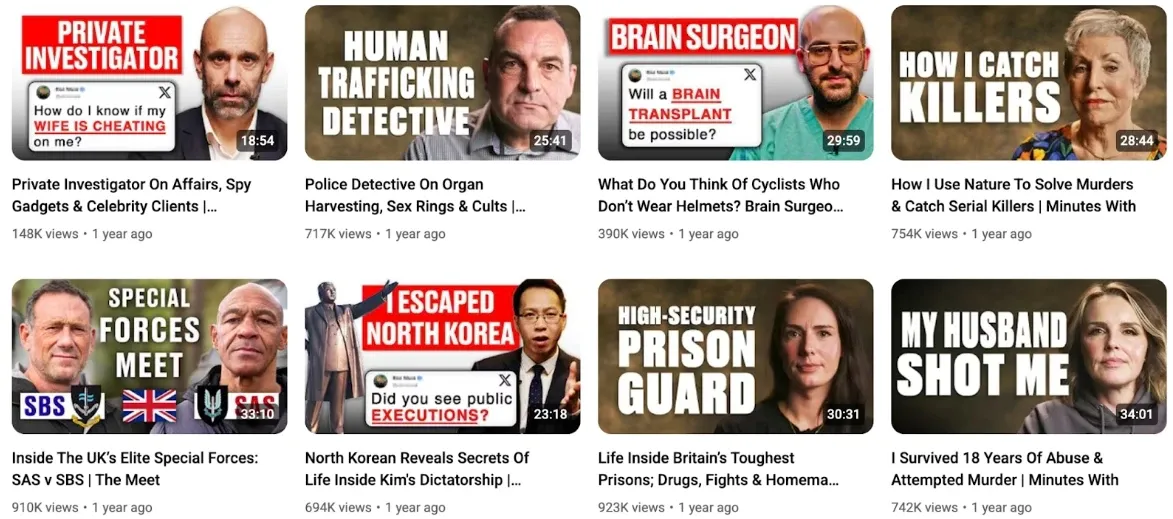
@LADbible Stories uses controversial questions effectively. Pair question thumbnails with titles from our YouTube SEO guide for maximum discoverability.
Before-After Comparisons
Before-and-after thumbnails show instant value. Viewers see the transformation they want before clicking.
Best for fashion, home improvement, fitness, and makeover niches. Use a split image with a dramatic but honest transformation — minimal text, let the visuals speak.
@JeremyEthier uses this format consistently with strong view counts.
Sound Bites & Impactful Quotes
Controversial or thought-provoking quotes on thumbnails trigger clicks — especially on hot-button topics.
Include the speaker's face plus a short quote in bold font. The quote should reflect something actually said in the video.
@jackneel uses impactful sound bites to drive engagement. For Shorts on trending topics, try Van Gogh Studio Agent.
Product Showcases/Features
Product review and comparison channels benefit from clean, product-focused thumbnails.
Let the product be the visual focus. A simple price tag or one-line opinion is enough — avoid cluttered text overlays.
@MKBHD keeps thumbnail design minimal and instantly recognizable.
Facts & Statistical Graphics
Bold numbers and stats reinforce authority on technical topics — sports, history, business, marketing, and finance.
Use large, readable text with clear supporting visuals.
@AliAbdaal uses data-driven thumbnails effectively, with many videos exceeding 100K views.
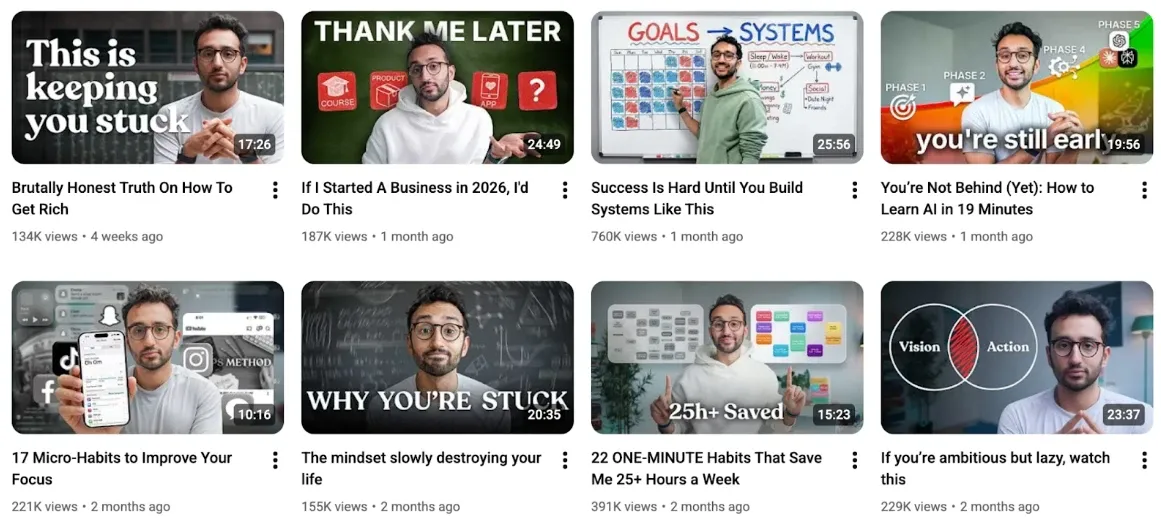
Create data-driven images with Van Gogh Studio's AI image generator.
Dramatic/Live Action Visuals
Bold, cinematic shots with minimal text — used by creators like @Sidemen to stand out in crowded feeds.
Take a dramatic screenshot from your video and enhance it for a cinematic look. These thumbnails set high expectations — deliver exciting content that satisfies.
Turn still frames into motion previews with image-to-video for Shorts teasers.
Personal Vlog/Satire Thumbnails
Authentic, unfiltered thumbnails work for vlog and satire content. Keep designs casual with witty one-liners.
@Lindsiann uses phrases like "Style for Dummies" to match her unfiltered brand voice.
Landscape-Themed Shots
Vivid landscape photos build suspense for travel and adventure content.
Let the location take center stage with 2–3 words max. Avoid overlays that block the view.
@BrettConti uses this format to build anticipation for adventure stories.
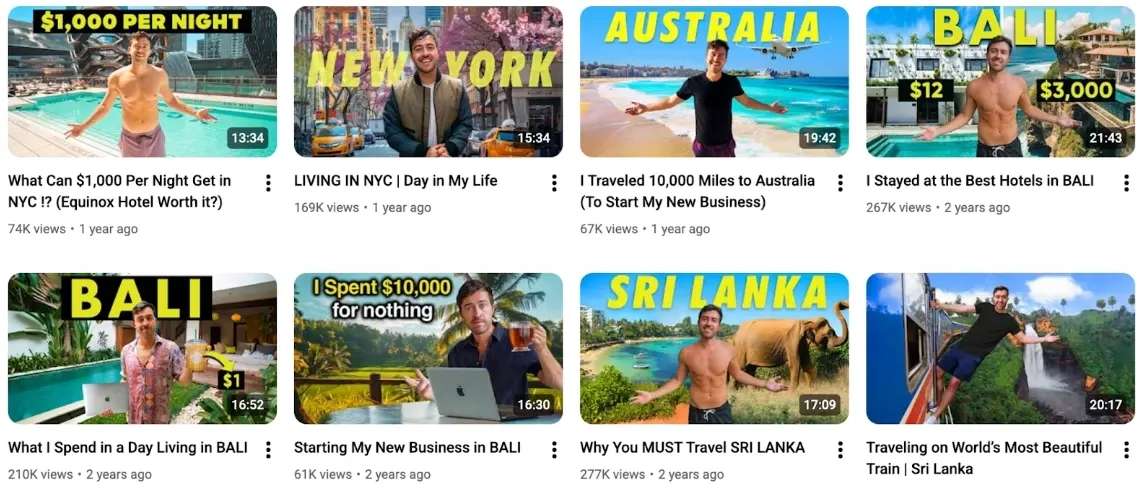
Animate landscape stills into short motion clips with image-to-video.
Conclusion
Your thumbnail is the first impression — and in 2026, it must earn clicks and set honest expectations. Pick a format from this list that fits your niche, test variations in YouTube Studio, and track CTR alongside retention in the YouTube analytics guide.
For thumbnails, intros, and full video production, explore Van Gogh Studio — everything you need to grow on YouTube.
You might also like
6 YouTube CTR Tips to Get More Clicks and Views
Complete CTR optimization — A/B testing, titles, intros, and metadata for 2026.
How to Get Higher CTR on YouTube
Advanced tactics for signature styles, trigger words, and playlist-driven CTR.
YouTube SEO Guide: Optimize Videos for More Views
Pair thumbnail design with keyword-optimized titles, descriptions, and tags.
How to Go Viral on YouTube in 2026
Thumbnail and title strategies within the full virality and viewer satisfaction framework.
How to Get More Views on YouTube: 12 Best Tips
12 proven tactics including thumbnail redesign, Shorts, and analytics.
How to Use Emotional Triggers to Get More YouTube Views
Six psychological triggers that make thumbnails and titles irresistible.
Create AI videos free
Try Van Gogh Studio free — text-to-video, image-to-video, and 300+ models in one place. Free credits on signup, no credit card required.
Try Free Video Generator


