

Kling AI offers free video credits to the public. However, primary users have no idea how to get those free credits.
Don't worry; we've got you. Let us walk you through how you can easily get these free credits and employ them smartly. As a bonus, we're also sharing how you can build the top out of these free credits. Let's begin!
How to Acquire Free Credits in Kling AI
Kling AI offers free credits so you can test out its features without spending money right away. Here are some of the best ways to get free Kling AI credits:
Method 1: Login Free Credits
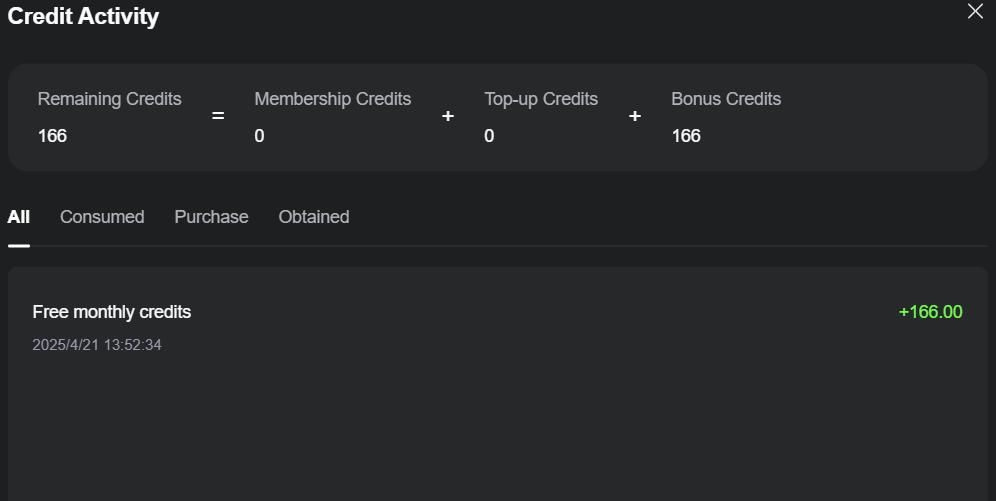
By simply logging into Kling AI, users can unlock 166 free monthly credits to jumpstart video generation projects. It is a straightforward way to dive into AI video creation without any upfront cost.
Method 2: Bonus Credits
Kling AI offers exciting chances to earn bonus credits through 2 distinct programs: the milestone bonus and the publishing bonus:
Milestone Bonus
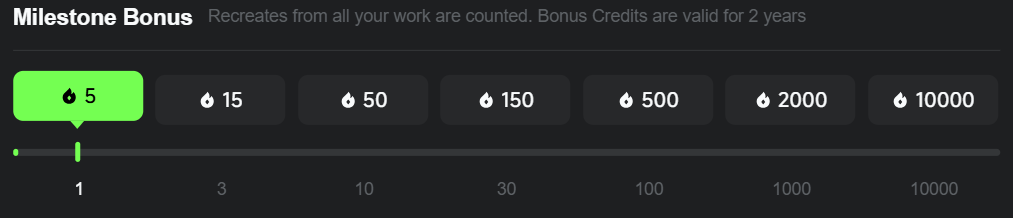
Its milestone bonus counts all the recreates users have received from their works. When you have hit a specific milestone, you will earn the corresponding bonus credits.
Publishing Bonus
The publishing bonus policy awards you 680 free credits for each short that you publish. To be eligible, every short needs to pass the review, and it's important to note that duplicate or similar content does not qualify.

Notice: Bonus credits earned from milestone bonus are valid for 2 years, even as publishing bonus are valid for only 1 month.
What Can Free Kling AI Credits Be Used For?
Free credits in Kling AI are super versatile. Here are some cool things you can do:
- Effects: utilize your free credits to create videos filled with impressive effects exclusively in Standard Mode.
- Text to Video & Image to Video: Convert text prompts or images into AI-generated videos in Standard Mode, producing only one output per instance.
- Sound Generation: Generate personalized audio by entering sound prompts, allowing your free credits to shape distinctive soundscapes.
- AI Virtual test-On: Try out up to 4 outputs during each session to visualize how clothing or accessories appear on a virtual model, providing an entertaining way to see styles with your free credits.
- Lip Sync: Align audio with your videos for realistic dialogue scenes, enabling your clips to seem lifelike, like having your animated character deliver a speech.
- Extend: Lengthen the video using the same mode as your original Kling AI video, allowing a maximum extension time of just 5 seconds.
What Can't Free Kling AI Credits Be Used For?
However, there are even so some limitations:
Removing Watermarks
If you're creating videos using Kling AI, your visual content will include a watermark when you leverage free credits. To remove watermarks and produce your projects look fully professional, you'll demand to upgrade to a premium plan or leverage some other tools.
Using Professional Mode
Professional mode, exclusive to paid accounts, offers advanced editing and customization tools not found in free plan. It is ideal for users seeking detailed control over video generation.
Top Tips for Using Free Credits
These detailed tips are for you:
- kick off Small: employ your free credits for simpler tasks like text-to-video projects first. This helps you get a appear for the platform without using up all your free credits too quickly.
- Plan Projects Around Free Credits: Since free credits are limited, planning your video projects around what you can achieve in a month is a better choice. employ them to experiment and test out features smartly.
- employ Better Prompts: You should always take a moment to write plain and detailed prompts when creating videos. This way, you'll get the best results without wasting extra credits on revisions.
Try Kling AI for Free on Van Gogh Studio

Van Gogh Studio has a free plan where you can test Kling AI's models without spending any money. Here are the different Kling models available in Van Gogh Studio:
- Kling 1.0: Set a new standard in video creation with its ability to generate high-quality 10-second video clips in mere minutes.
- Kling 1.5: Added 1080p HD outputs, motion brush features and enhances the features of its predecessor.
- Kling 1.6: 195% improvement in image-to-video creation capabilities compared to Kling 1.5, with a smart understanding of any text prompts.
- Kling 2.0: The latest video model from Kling AI. This new model features improved prompt understanding, enhanced character motion dynamics, etc.
Conclusion
Kling AI's free credits provide an excellent opportunity to test out some of the top creative features of it. even as they don't include advanced features like watermark removal, they're perfect for testing and learning the platform better.
Create AI videos free
Try Van Gogh Studio free — text-to-video, image-to-video, and 300+ models in one place. Free credits on signup, no credit card required.
Try Free Video Generator


