

Encountering the "Sorry, this content is age-restricted" message is one of the most frustrating experiences for any YouTube viewer. Whether you are trying to access educational documentaries or trending entertainment, the age-restriction filter often acts as a digital wall.
Understanding how to turn off age restriction on YouTube is essential for regaining control over your viewing experience. In 2026, YouTube has tightened age verification requirements globally — so knowing the difference between Restricted Mode and hard age gates matters more than ever.
As a creator, remember that professional teams use tools like Van Gogh Studio to produce high-quality, advertiser-friendly videos that avoid these filters altogether.
In this guide, we provide a comprehensive roadmap to remove age restrictions on YouTube so you can enjoy a truly open platform.
Quick Verdict
Restricted Mode is a toggle in your account settings — turn it off on desktop or mobile to see more content. Hard age restrictions require a verified Google Account birthdate showing you are 18+. If you are on a Brand Account, switch to your personal profile or complete age verification on the owner account. Creators should focus on advertiser-friendly content using Van Gogh Studio Agent to avoid restrictions in the first place.
Difference Between YouTube Restricted Mode and Age Restriction
Before diving into the steps, it is vital to distinguish between two different features.
YouTube age restriction is applied to specific videos that the platform deems unsuitable for users under 18. This is typically based on content involving violence, sensitive topics, or mature language. You cannot simply toggle this off with a switch — it is tied directly to your verified identity.
Restricted Mode is an optional setting used by schools, parents, and libraries to filter out potentially mature content. If you see the message "this video is age-restricted and only available on YouTube," you might be dealing with either a hard age wall or a soft Restricted Mode filter. Turning off Restricted Mode is a different process from bypassing age verification.
How to Turn Off YouTube Restricted Mode on Desktop
If you are on a computer and want to turn off Restricted Mode, the process is straightforward.
- Click on your profile picture in the top-right corner of the screen.
- Scroll to the bottom of the drop-down menu where you will find Restricted Mode.
- Click it and toggle the switch to Off.
Once toggled off, you should be able to view previously filtered content. If the setting is grayed out, your network administrator or ISP might have locked it — common in workplace or educational environments.
Disabling Restricted Mode on Mobile Devices
For those wondering how to take off age restriction on YouTube via mobile, the steps vary slightly between Android and iOS.
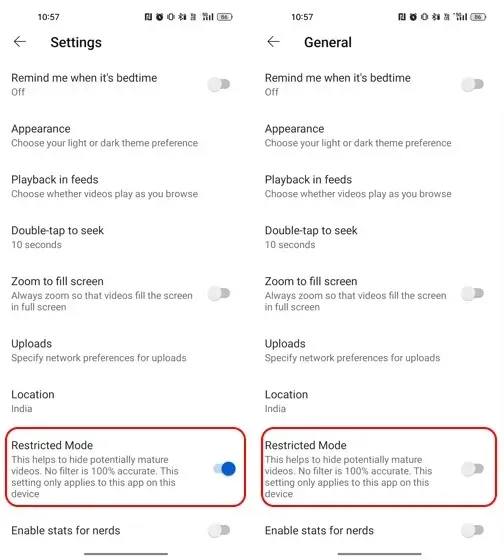
Android: Open the YouTube app, tap your profile icon, go to Settings > General, and toggle Restricted Mode off.
iOS: Navigate to Settings > Account within the app to find the same toggle.
Remember, this only removes the Restricted Mode filter; it does not bypass the strict YouTube age restriction that requires a verified birthdate over 18.
How to Edit Your Age on YouTube to Remove Restrictions
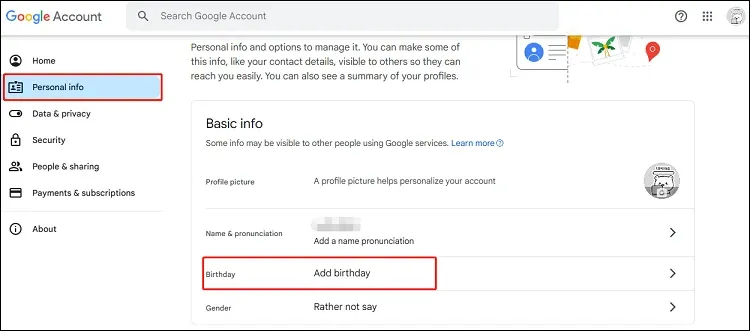
If you are still seeing "Sorry, this content is age-restricted," your Google Account birthdate might be incorrect or missing.
To fix this, edit your age through your Google profile:
- Visit myaccount.google.com and go to Personal info.
- Locate the Birthday field and ensure the year makes you at least 18 years old.
- Google may require verification with a credit card or valid ID to confirm your age.
Once verified, the age restriction is lifted automatically across all devices linked to that account.
Troubleshooting the Age Restriction Error
Sometimes, even after updating your settings, you might still see age-restricted messages. This commonly happens if you are using a Brand Account — YouTube frequently restricts Brand Accounts from viewing mature content regardless of the owner's age.
Checking Brand Account Settings
Switch back to your personal profile to test. If the video suddenly becomes available, you have identified the issue. If you must use a Brand Account, ensure the primary owner account has completed the age verification process.
Browser Cache and VPN Issues
A cluttered browser cache can lead to persistent restriction messages. Clear your cookies and cache to force YouTube to recognize your updated age settings. Additionally, if you are using a VPN, the local laws of the server location might enforce stricter age restrictions than your home country.
How to Watch Age Restricted YouTube Videos Safely
If you cannot alter your account settings, you might look for ways to watch age-restricted YouTube videos without logging in.
While some third-party websites offer "bypass" tools, these are regularly filled with ads and security risks. The safest method is always through official account verification. Never share your Google credentials with unofficial services.
Creating YouTube-Friendly Content with Van Gogh Studio
As a creator, having your video age-restricted can kill its reach and disqualify it from monetization. The goal is to never have your content restricted in the first place.
Van Gogh Studio Agent is designed for marketing teams and e-commerce professionals. It creates post-ready videos that are immersive and engaging without relying on "edgy" content that triggers age restrictions.
Popular Van Gogh Studio Use Cases for Professional Growth
These use cases help you maintain a high frequency of advertiser-friendly content — the key to maximizing both monetization and organic growth in 2026:
- YouTube intro generator: Create viral, compliant intros in seconds.
- Video thumbnail maker: Design click-worthy thumbnails without mature imagery.
- YouTube growth strategy generator: Plan content that stays within community guidelines.
Why YouTube Enforces These Restrictions
YouTube faces immense pressure from advertisers and regulators to keep children safe. The platform's 2026 COPPA and brand-safety policies mean the algorithm aggressively filters restricted content. For advertisers, being associated with age-restricted videos can be a brand safety nightmare.
By following the rules and creating compliant content with Van Gogh Studio, you maintain a healthy relationship with the platform's algorithm and unlock full monetization potential.
Final Checklist for Unlocking YouTube Content
If you are still struggling to view content, run through this quick checklist:
- Confirm that Restricted Mode is toggled Off in your account settings.
- Verify that your Google Account birthday makes you older than 18.
- Ensure you are not using a Brand Account that lacks age verification.
- Check if your network or school administrator has enforced a filter.
- Clear your browser cache and disable any conflicting VPNs.
Conclusion
As the digital landscape evolves in 2026, staying informed about these settings is vital for both viewers and creators. Whether you are adjusting your birthdate or toggling off Restricted Mode, these steps empower you to see the full spectrum of content available.
For creators in the marketing space, the goal is to produce content that speaks to everyone without triggering restrictions. By leveraging the Van Gogh Studio suite, you can create production-ready videos that are both viral and professional.
You might also like
How to Make Money on YouTube in 2026
Every monetization path — YPP, affiliates, brand deals, and fan funding.
YouTube Shorts Monetization Guide
2026 Shorts RPM, YPP thresholds, and eight revenue methods beyond ad revenue.
How to Grow on YouTube in 2026
Eight proven growth strategies that keep your content advertiser-friendly.
Make Money on YouTube Without Showing Your Face
Faceless channel ideas that stay compliant and monetize effectively.
How to Create a YouTube Automation Channel
Build a faceless channel with AI tools while staying within community guidelines.
YouTube SEO Guide: Optimize Videos for More Views
Metadata best practices that maximize reach without triggering content filters.
Create AI videos free
Try Van Gogh Studio free — text-to-video, image-to-video, and 300+ models in one place. Free credits on signup, no credit card required.
Try Free Video Generator


