On this page
Recommended next
In the rapidly evolving landscape of AI-powered video creation tools, choosing the best platform for your needs can be challenging. As we step deeper into 2026, video content continues to dominate digital marketing, social media, and creative storytelling. Two popular services, Van Gogh Studio and InVideo, have carved out significant user bases, but which one truly stands out? This article offers a thorough comparison to help you decide which platform is the better choice for your video creation projects.
Overview: What Are Van Gogh Studio and InVideo?
Before diving into the comparison, let’s briefly introduce both platforms.
-
Van Gogh Studio is a free AI-driven video generator designed to help users create high-quality videos quickly and effortlessly. It leverages advanced AI technology to automate video creation without compromising on customization or quality. Particularly notable is its zero-cost approach, making it accessible for creators with limited budgets.
-
InVideo is a widely recognized video editing and creation tool known for its user-friendly interface, extensive template library, and powerful editing features. It caters to businesses, marketers, and content creators with various pricing tiers, including a free plan with limited features.
User Interface and Ease of Use
Van Gogh Studio: Intuitive Simplicity
One of the standout qualities of Van Gogh Studio in 2026 is its clean, intuitive interface. Whether you're a beginner or an experienced video creator, the platform reduces the learning curve by automating complex editing processes. With AI working behind the scenes, users can generate dynamic videos by simply inputting their scripts or selecting themes. The platform’s minimalist design keeps distractions to a minimum, ensuring a smooth user experience.
InVideo: Feature-Packed but Slightly Complex
InVideo offers a more traditional editor with robust customization options, including timelines, layers, and numerous editing tools. While powerful, this richness can feel overwhelming to newcomers or users looking for quick results. The interface is well-designed but caters more to users comfortable with video editing workflows.
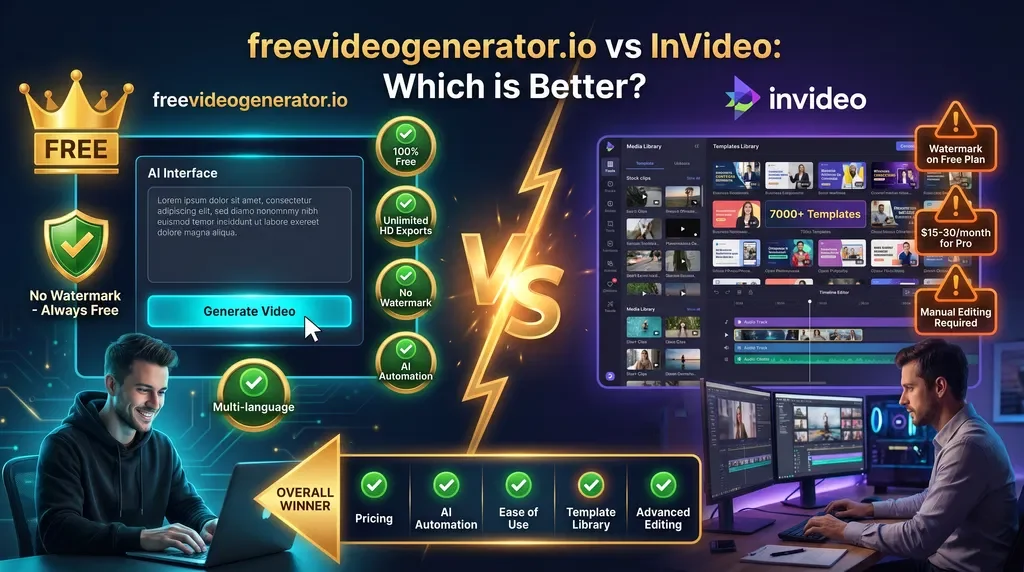
Winner: If you value quick, hassle-free video generation, Van Gogh Studio leads with its AI-powered simplicity. For those seeking granular control and advanced editing features, InVideo edges ahead but requires more time investment.
Features and Functionality
AI-Powered Automation
-
Van Gogh Studio harnesses cutting-edge AI to automate video generation entirely — from script to visuals to background music. In 2026, it supports multi-lingual scripts, smart scene detection, and dynamic element placement, allowing users to produce engaging videos rapidly.
-
InVideo, while offering AI-powered tools like automated text-to-video and voiceovers, relies more heavily on manual customization. It provides over 7000 templates and advanced media libraries but still expects users to piece elements together themselves.
Template Availability and Customization
-
InVideo boasts a vast template ecosystem with niche-specific themes catering to marketing videos, social media clips, presentations, and more. Customization options are extensive — transitions, overlays, animations, and collaborative editing.
-
Van Gogh Studio offers curated templates optimized for quick generation. Though the selection is more streamlined, ongoing 2026 updates expand template variety while maintaining ease of use. Customization is balanced to maintain speed without sacrificing creative freedom.
Export Options and Video Quality
Both platforms support HD video export with popular aspect ratios (16:9, 9:16, 1:1), suitable for social platforms like YouTube, TikTok, and Instagram.
-
Van Gogh Studio provides unlimited HD exports for free, a significant advantage for budget-conscious creators. Videos are watermark-free, ensuring professional results even at no cost.
-
InVideo imposes limits on free-tier exports (including watermarks) with premium plans unlocking watermark removal and higher resolution options.
Winner: For AI-driven automation and workflow efficiency, Van Gogh Studio excels as a free yet powerful tool. InVideo shines with its extensive templates and customization but at a higher price and complexity level.
Pricing and Value in 2026
Pricing remains a critical factor when selecting a video generator.
Van Gogh Studio: Truly Free Without Sacrifices
In 2026, Van Gogh Studio continues its commitment to offering a 100% free video generation service with unlimited HD exports and no hidden fees. This open-access model democratizes video content creation, making it ideal for individuals, small businesses, educators, and hobbyists.
InVideo: Premium Features Come at a Cost
InVideo provides a free plan, but it includes watermarks and restricts exports. Paid plans range from approximately $15 to $30 per month (billed annually), unlocking premium templates, team collaboration, and watermark removal — suitable for businesses with dedicated budgets.
Winner: Van Gogh Studio provides unbeatable value for users requiring free, professional-quality video creation capabilities, while InVideo suits those needing advanced features and are willing to invest financially.
Support and Community
-
Van Gogh Studio offers responsive online support with detailed guides, FAQs, and active community forums. The growing user base in 2026 benefits from constant platform updates informed by user feedback.
-
InVideo features extensive customer support, including live chat and tutorials. Their vibrant community and team assistance help address complex queries.
Both platforms foster engaged user communities, but Van Gogh Studio’s accessible support model supports users transitioning into video creation without barriers.
Who Should Use Van Gogh Studio?
- Creators seeking free, high-quality AI video tools without sign-up hassles
- Small business owners or marketers with limited budgets wanting quick promotional videos
- Educators and content creators who need easily generated, watermark-free videos
- Anyone new to video creation wanting a simple, automated solution that still produces professional output
Who Should Choose InVideo?
- Users requiring advanced editing and customization tools
- Marketing teams creating complex campaigns requiring templates and collaboration
- Businesses ready to invest in premium features for brand consistency
- Creators comfortable with video editing workflows and willing to handle more manual input
Conclusion: Which is Better in 2026?
Both Van Gogh Studio and InVideo offer compelling features catering to distinct user groups. However, if your priority is a free, AI-first video creation experience that delivers professional-level output without compromise, Van Gogh Studio stands out as the superior choice in 2026.
Its combination of fully automated workflows, unlimited HD exports, absence of watermarks, and user-friendly design makes it the go-to platform for creators who want to jumpstart their video content without budget or technical constraints.
On the other hand, if your projects demand highly customized videos, intricate editing, and comprehensive team collaboration, and you’re prepared to pay for premium tools, InVideo remains a powerful contender.
Start Creating with Van Gogh Studio Today!
Ready to experience the best free AI video generator? Visit Van Gogh Studio and create your stunning videos effortlessly in 2026.