Want an ad-free experience? Upgrade your plan.

Comparisons

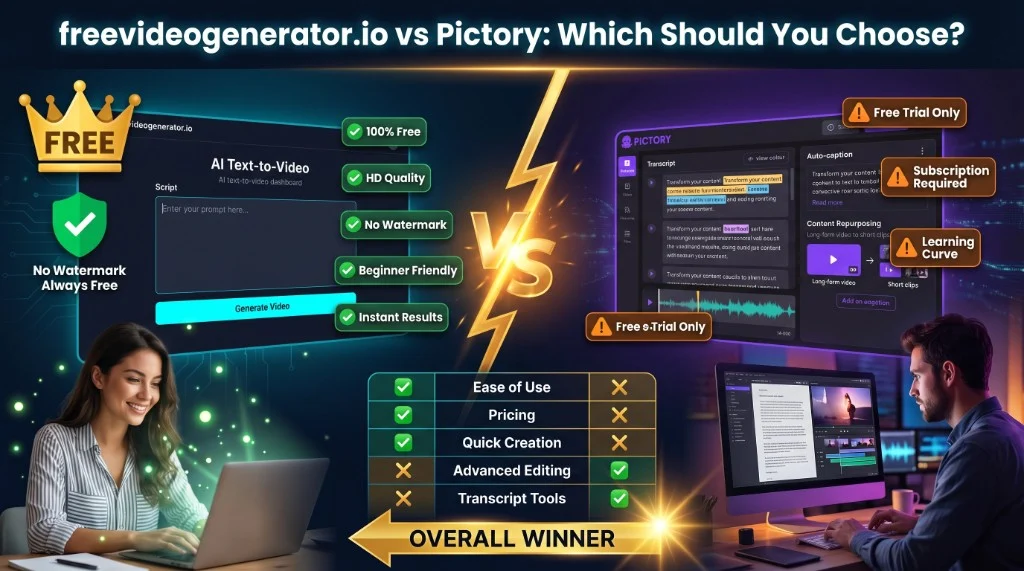
In the rapidly evolving world of AI-powered video creation, choosing the right tool can feel overwhelming. As we move through 2026, two platforms stand out for both beginners and professionals: Van Gogh Studio and Pictory. Both promise to simplify video production, but they target slightly different workflows. This article breaks down their features, usability, pricing, and overall value. For a compact comparison landing page, you can also read our dedicated Pictory comparison.
Van Gogh Studio (Van Gogh Studio) is a free AI video generator designed to help users create high-quality videos with minimal friction. It suits creators who want quick text-to-video and image-to-video workflows, flexible AI models, and a generous free entry point.
Pictory is a long-standing AI video platform known for script- and blog-to-video workflows, automatic highlights, and caption-heavy outputs—often used by marketers repurposing long-form content into short clips. It is primarily subscription-based after trial limits, with more advanced control behind paid tiers.
Van Gogh Studio
Built for a short learning curve: a streamlined path from prompt or image to a finished clip. The dashboard keeps the focus on generation rather than deep timeline editing.
Pictory
Offers a fuller editing surface: text-to-video, highlight extraction, and auto-captions. The trade-off is more screens and options, which can take longer for absolute beginners to learn.
Van Gogh Studio
Strong at text- and image-to-video with multiple AI models, templates, and fast iteration—ideal for ads, promos, and social assets when you want new footage from a prompt or stills.
Pictory
Shines at turning long-form text or transcripts into narrated, captioned videos and short highlights—excellent for repurposing webinars, podcasts, or blog posts.
Van Gogh Studio
Offers solid customization within a free-first model: templates, style choices, music, and easy scene-style outputs without professional editing experience.
Pictory
Pushes deeper into editing and branding for team workflows (voice, scene-level text, libraries). Many advanced options sit on paid plans.
Van Gogh Studio
Produces HD results suited to social, web, and presentations, with simple download paths for everyday publishing.
Pictory
Typically supports multiple resolutions and platform-oriented exports on higher plans, including direct publishing where available—useful for always-on content pipelines.
Van Gogh Studio
Positioned as genuinely free to start with monthly credits, no paywall to experiment, and clear upgrade paths if you need longer or higher-end outputs.
Pictory
Trial then subscription pricing. Strong for teams with recurring repurposing work; less ideal if you only need occasional clips or a zero-cost path.
Video remains central to growth in 2026. Van Gogh Studio lowers the barrier: cloud-based, no heavy install, and a workflow built for “idea → video” in minutes.
Modern text-to-video and image-to-video features reduce manual assembly—helpful for solo creators, SMBs, and anyone shipping weekly content.
Promos, explainers, social ads, short tutorials, and product-style demos all fit—especially when you want new generated visuals rather than only cutting existing long footage.
Choose Pictory when you depend on transcript-based editing, heavy captioning, and turning long recordings or articles into many derivative clips, and you are ready to pay for a subscription to unlock the full feature set.
If you want a free, easy-to-use AI video generator in 2026 with a strong “generate from text or image” path, Van Gogh Studio is the top pick for value and speed.
To try it, visit Van Gogh Studio and start your first project today.
Empower your content creation with the tool that matches your workflow—and let Van Gogh Studio be the catalyst for your next videos in 2026 and beyond.
An in-depth comparison between Fotor AI Video Generator and Van Gogh Studio.
Read articleAn in-depth comparison of Van Gogh Studio and Runway in 2026, highlighting features, usability, pricing, and why Van Gogh Studio stands out as the best free AI video generator.
Read articleA comprehensive 2026 comparison between Van Gogh Studio and Canva Video, helping creators choose the best free AI video tool for their projects.
Read articleFree AI tools to go from idea to publish — pick a tool and start creating in minutes.

Set two key frames — AI fills the smooth transition between them.
Turn still images into cinematic video
Open
Upscale for HD display or print
Open
Extend clips with AI continuation
Open
Blend MP3/WAV/M4A with your clip, mute original optional
Add music or voiceover to your video
Open
Generate subtitles for your videos automatically
Add subtitles for social reach
Open
Extract a frame, add text, export YouTube sizes
Design a click-worthy thumbnail
Open| Aspect | Van Gogh Studio | Pictory |
|---|
| Ease of use | Very quick to start; prompt-led | More options; steeper for newcomers |
| Pricing | Free tier with clear limits | Primarily paid after trial |
| Video style | Text/image-to-video, multiple models | Blog/script/highlight and captions |
| Best for | Fast AI-generated clips, free start | Transcript- and long-form repurposing |