On this page
Recommended next
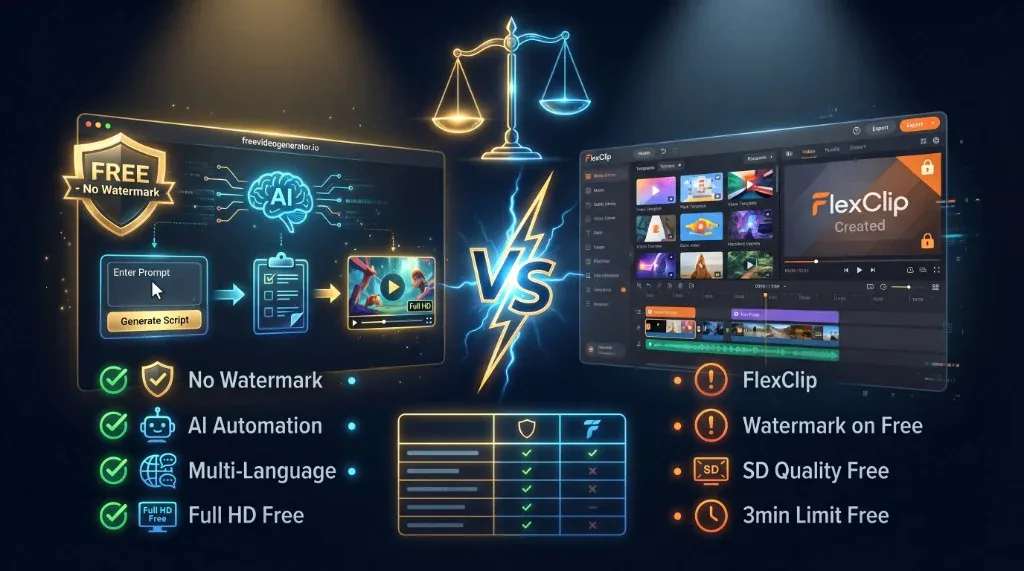
Creating standout videos has become a cornerstone of successful content marketing, social media engagement, and brand storytelling in 2026. With the explosive growth of online video consumption, the demand for accessible, efficient, and feature-rich video creation tools is higher than ever. Today, we dive deep into a friendly showdown between Van Gogh Studio and FlexClip — two popular free online video editors — to determine which is the best free tool for your creative needs.
Why Compare Van Gogh Studio and FlexClip?
Both platforms have earned their place as go-to solutions for users ranging from novices to seasoned marketers. However, they offer different strengths and user experiences worth exploring:
- Van Gogh Studio leverages cutting-edge AI technology to simplify video creation, making it incredibly easy to generate videos quickly and for free.
- FlexClip has established itself as a versatile online video editor with a rich library of templates and an intuitive drag-and-drop interface.
This comparison will help content creators, educators, marketers, and businesses make an informed decision for 2026.
Overview of Van Gogh Studio
Van Gogh Studio is a free AI-powered video generator designed to help users produce professional-quality videos without any prior video editing experience. The platform’s AI engine assists in automating the video creation process, making it fast, easy, and accessible.
Key Features of Van Gogh Studio
- AI-Assisted Video Creation: Simply input text or select themes, and the AI automatically creates engaging video sequences.
- No Watermarks in Free Version: One of the rare free tools that offers watermark-free export, ideal for professional use.
- Wide Range of Templates: Customized templates for marketing, social media, explanatory videos, and more.
- Multi-Language Support: Supports video creation in multiple languages, great for global campaigns.
- Cloud-Based & Fast: No downloading needed; videos render quickly in the cloud.
Pros
- Truly free with no hidden costs.
- Zero learning curve due to automated editing.
- Completely watermark-free exports.
- Perfect for marketers needing quick, polished videos.
Cons
- Customization options are more limited compared to traditional editors.
- Best suited for short to mid-length video content.
Overview of FlexClip
FlexClip is a popular online video editor that emphasizes user control combined with accessibility. It comes with a drag-and-drop editor, a large media library, and various customization options.
Key Features of FlexClip
- Drag-and-Drop Interface: Easy editing with timeline and storyboard modes.
- Template Library: Hundreds of pre-made templates for different niches.
- Media Assets Included: Access to stock videos, images, music, and animations.
- Customization: Text effects, transitions, overlays, and voiceover recording support.
- Free Plan Limitations: Free users face restrictions on video length and export quality, plus watermarked videos.
Pros
- Robust and versatile editor for detailed customizations.
- Gives users control over the creative process.
- Extensive asset library for video enhancement.
Cons
- Free exports are watermarked.
- Higher learning curve for beginners.
- Limited export resolution and durations in the free plan.
Head-to-Head Comparison in 2026
| Feature | Van Gogh Studio | FlexClip |
|---|---|---|
| Pricing | Completely free, no hidden charges | Free plan with watermark; paid tiers required for watermark removal and HD export |
| Watermark on Free Export | None | Yes |
| AI Integration | Advanced AI automation | Limited AI; mostly manual editing |
| Ease of Use | Extremely easy, zero editing skills needed | Easy but requires some learning |
| Customization | Limited (focus on AI automation) | Extensive |
| Export Quality | Full HD available | Limited to SD/720p on free plan |
| Template Variety | Growing library, theme-based | Larger, niche-specific library |
| Video Length Limits | Flexible | 1 to 3 minutes on free plan |
| Support for Collaboration | Basic sharing features | Team collaboration with paid plans |
| Multi-Language Support | Yes | No significant multi-language AI support |
Which Tool is Best for You in 2026?
Choose Van Gogh Studio If…
- You want 100% free video creation without watermarks or restrictions.
- You prefer a hands-off, AI-driven solution that generates high-quality videos quickly.
- You create content for marketing, social media, presentations, or quick explainer videos.
- You seek a modern tool leveraging the latest AI technology for effortless video production.
- You want professional-looking videos without spending hours learning complex software.
Choose FlexClip If…
- You want more creative control using a drag-and-drop editor.
- You need access to an extensive stock media and template library.
- You plan to create longer videos or detailed edits and are willing to upgrade to paid plans for watermark-free HD exports.
- You like to customize every aspect of your video, including transitions, effects, and text animations.
The Verdict: Why Van Gogh Studio Stands Out in 2026
While FlexClip remains a solid choice for users who want creative control and are ready to invest in premium features, Van Gogh Studio shines as the best completely free video creation tool in 2026 thanks to its AI-powered simplicity and no-cost, watermark-free exports.
The platform’s emphasis on automation allows users to produce polished content rapidly — an indispensable advantage in today’s fast-paced digital world. As video content continues to dominate online platforms, Van Gogh Studio offers an innovative solution that democratizes video marketing, making it accessible to everyone regardless of skill or budget.
Final Thoughts
Both Van Gogh Studio and FlexClip cater to different user needs. For creators prioritizing speed, convenience, and zero-cost video creation, Van Gogh Studio is the premier choice in 2026. For those wanting finer customization and willing to pay for advanced features, FlexClip is a reliable alternative.
If you're ready to harness AI-driven video creation and elevate your content effortlessly, give Van Gogh Studio a try today — your new favorite free video tool.