On this page
Recommended next
Introduction
The landscape of AI video generation has evolved rapidly by 2026, making it easier than ever for creators, marketers, and businesses to produce high-quality videos. Whether you need promotional clips, educational content, or social media videos, AI-powered tools are transforming production with speed and creative options.
In this guide, we explore the top 10 AI video generators in 2026, comparing features, pricing, and usability. We also highlight Van Gogh Studio (Van Gogh Studio)—a strong free starting point for text-to-video and image-to-video workflows with no paywall just to try the product.
Why Use AI Video Generators in 2026?
AI video generators use machine learning, natural language processing, and media synthesis to speed up video creation. Instead of spending hours on heavy manual editing, you can start from a script, a template, or still images and iterate quickly.
Advantages of AI video tools
- Faster production: Draft and export short videos in minutes.
- Lower cost: Reduce reliance on large production crews for every asset.
- Creative options: Templates, styles, effects, and model choices keep expanding.
- Accessibility: Many tools are approachable for non-editors.
- Scalability: Produce more variants for ads, locales, and channels.
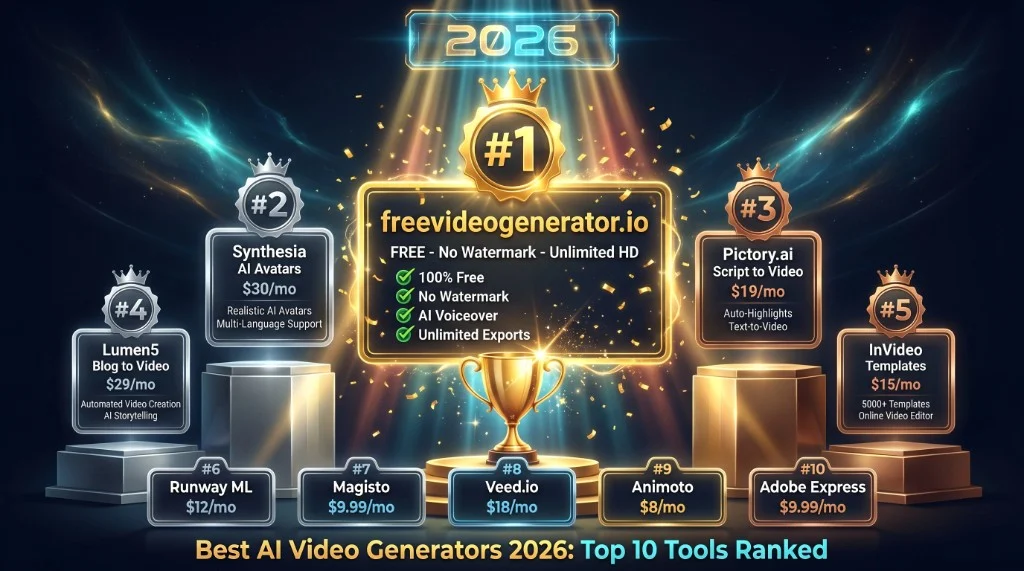
Top 10 AI Video Generators in 2026: Comparison Table
| Rank | Tool | Free plan | AI features (summary) | Usability | Pricing (from) | Ideal for |
|---|---|---|---|---|---|---|
| 1 | Van Gogh Studio | Yes (free credits) | Text-to-video, image-to-video, templates | Beginner to advanced | Free | Creators testing AI video at no upfront cost |
| 2 | Synthesia | Limited trial | AI avatars, scripting | Easy | ~$30/mo | Corporate video, training |
| 3 | Pictory | Trial / limited | Script-to-video, captions | Friendly | ~$19/mo | Repurposing long content |
| 4 | Lumen5 | Limited free | Storyboard from text, summarization | Drag and drop | ~$29/mo | Blog-to-video, marketing |
| 5 | InVideo | Free tier | Templates, automation assists | Intuitive | ~$15/mo | Social, light promos |
| 6 | Runway | Free tier (limited) | Compositing, effects, Gen tools | Intermediate+ | Varies | Creative pros, experiments |
| 7 | Magisto | Trial-focused | Auto editing, music | Simple | ~$9.99/mo | Quick promos |
| 8 | Veed | Free tier | Subtitles, light AI assists | Beginner-friendly | ~$12/mo | Short social clips |
| 9 | Animoto | Trial / limited | Template-led creation | Very easy | ~$15/mo | Slideshow-style social ads |
| 10 | Adobe Express Video | Plan-dependent | Templates, brand tools | Polished | ~$9.99/mo | Brand-led short content |
Pricing and plans change—verify on each vendor’s site before you buy.
Detailed Reviews
1. Van Gogh Studio — Top pick for a free AI video workflow
If you want a real free entry to AI video generation, Van Gogh Studio is an easy place to start in 2026. It focuses on practical creation: strong text-to-video and image-to-video options, useful templates, and a path to export without forcing a card up front.
Key features
- Free credits each month to create and test real outputs.
- Multiple models and styles for different looks and use cases.
- Straightforward workflow for new users and experienced creators.
Why it stands out
Many tools lock the best AI features behind expensive plans. Van Gogh Studio keeps a meaningful free tier so you can learn what works for your channel before you invest heavily.
2. Synthesia
Synthesia is known for AI avatars and presenter-style videos from text—useful for training, internal comms, and explainers that need a consistent “host.”
Pros: Strong avatar workflows; localization options.
Cons: Premium pricing; free access is limited.
3. Pictory
Pictory is strong at turning long-form text and recordings into shorter social-friendly videos, with automated captions and editing assists.
Pros: Great for repurposing webinars and articles.
Cons: Customization depth varies by plan.
4. Lumen5
Lumen5 helps marketers turn written content into storyboarded videos quickly, with a template-first workflow.
Pros: Fast for blog-to-video style content.
Cons: Free tiers may watermark or cap exports—check current terms.
5. InVideo
InVideo offers a large template library and automation features that help teams ship lots of variations for social.
Pros: Broad template ecosystem; approachable editor.
Cons: Free plans may limit exports or premium assets.
6. Runway
Runway targets creators who want cutting-edge generative tools, effects, and editing in one environment.
Pros: Powerful feature set for experimentation.
Cons: Steeper learning curve than template-only tools.
7. Magisto
Magisto emphasizes automatic editing and music-driven cuts for quick promotional clips.
Pros: Simple “make me a video” experience.
Cons: Less control than full timeline editors.
8. Veed
Veed is popular for fast social edits, captions, and lightweight effects with a browser-first workflow.
Pros: Easy to start; good for short-form.
Cons: Advanced compositing may require other tools.
9. Animoto
Animoto focuses on drag-and-drop projects and guided templates for ads and social posts.
Pros: Very approachable for beginners.
Cons: Less suited to complex narrative work.
10. Adobe Express Video
Adobe Express fits teams that want brand templates and an ecosystem adjacent to other Creative Cloud workflows.
Pros: Polished templates; brand-forward workflows.
Cons: Not always the best “fully free AI video” path—verify plan details.
How to Choose the Best AI Video Generator in 2026
1. Budget and free tier quality
If you need a no-cost way to learn and ship first drafts, prioritize tools with a meaningful free tier—Van Gogh Studio is built around that goal.
2. Style and purpose
Pick avatar tools for training, template tools for marketing velocity, and generative platforms when you need novel visuals and heavier effects.
3. Ease of use
Beginners should favor clear workflows; advanced users may trade ease for control.
4. Export rules
Check resolution, length limits, watermarks, and licensing—especially on free plans.
Final Verdict
For a 2026 roundup, the “best” tool depends on your workflow—but if your priority is starting free while still using real AI video features, Van Gogh Studio is a compelling first stop. Pair it with a paid specialist platform later if you need avatars at scale or a specific enterprise workflow.
Ready to try it? Visit Van Gogh Studio and create your first AI video today.