

AI video is no longer only about making clips look real. The bigger question is whether a model can understand what the video is meant to show.
That is why Gemini Omni feels important. It brings video generation, chat-based editing, and remixing into one native multimodal workflow inside Gemini — almost like a “Nano Banana” moment for AI video.
The clearest example is a professor writing formulas on a chalkboard. The model has to keep text, symbols, handwriting, timing, motion, and meaning coherent at once.
Gemini Omni points to video creation built around contextual understanding, not just visual realism, and may hint at Google’s direction for Veo 4.
Quick Verdict
| Review point | My take |
|---|---|
| Best for | Conversation-led create → edit → remix loops; education / formula scenes; targeted object fixes |
| Not best for | One-shot “fire and forget” cinematic ads with no revision path |
| Core inputs | Prompt + optional image / clip / audio / template references |
| Core outputs | Generated or edited video you can keep reshaping in chat |
| Biggest strength | Multimodal context + plain-language edits without rebuilding the timeline |
| Biggest weakness | Product workflow details (history, versions, template UX) are still maturing |
| Try it | Gemini Omni on Van Gogh Studio via AI Video Studio |
Bottom line: Gemini Omni matters less as a single “best looking” clip, and more as a back-and-forth way to direct video. For publish-ready campaigns across models, I still prefer Van Gogh Studio.
What Is Gemini Omni?
Gemini Omni is Google’s native multimodal video model inside the Gemini ecosystem, and it may also hint at the direction Google takes for Veo 4. It brings video generation, editing, remixing, and multimodal understanding into one workflow.
You are not just asking for a video. You are telling the model what the video should become, then continuing from there. Instead of working like a traditional video generator, Gemini Omni treats text, images, clips, templates, and edits as different kinds of creative context.
That is why the “Omni” idea matters: Gemini Omni is less mode-based and more intent-based.
Why Gemini Omni Feels Different
Many AI video tools still follow a rigid loop: write a prompt, wait, judge the result, and start over if something is wrong.
Gemini Omni aims for a more natural loop: generate, review, ask for a change, keep the useful parts, and reshape the video. The clip feels less like a fixed lottery ticket and more like something you can keep directing.
Input → Output Specs
| Mode | What you put in | What you get out |
|---|---|---|
| Multimodal generate | Prompt + optional clip / image / audio / template | New video guided by those references |
| Chat edit | Existing clip + plain-language change request | Edited video (logo remove, object swap, etc.) |
| Remix | One or more source clips + creative brief | Combined / restyled commercial or story cut |
| Knowledge scene | Topic prompt (history, biography, lesson) | Structured explanatory / narrative clip |
Key Features of Gemini Omni (with Prompt → Output demos)
Native Multimodal Video Generation
Gemini Omni moves beyond one fixed input type. A prompt, image, video clip, audio reference, or template can all help guide the result.
| Prompt (input) | Video clip (input) | Output |
|---|---|---|
| A natural UGC skincare ad featuring a young woman with long reddish-brown hair, visible freckles, and fresh minimal makeup. She holds a green face cream jar close to the camera, applies the cream to her face, and shows a clear before-and-after skin change, from bare textured skin to a smoother, softer, glowing finish. |
The skincare clip kept the character realistic and the product visually consistent — much more polished than a typical one-pass UGC generation.
Chat-Based Video Editing
The most practical feature is conversational editing. Instead of using a timeline or rebuilding a clip, you describe the change.
| Prompt (input) | Input video | Output video |
|---|---|---|
| Remove the logo of Sora2 in this video clip. | 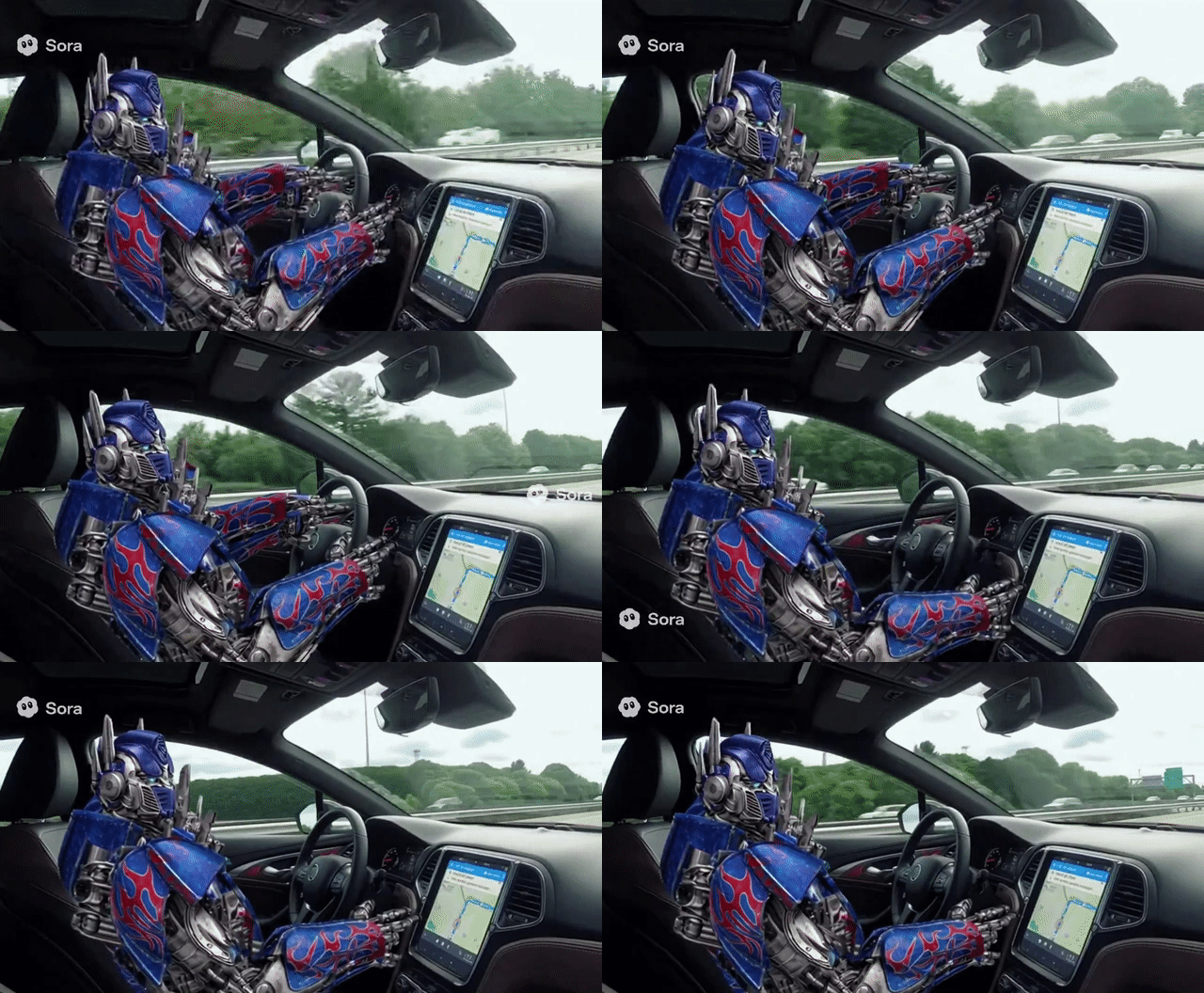 | 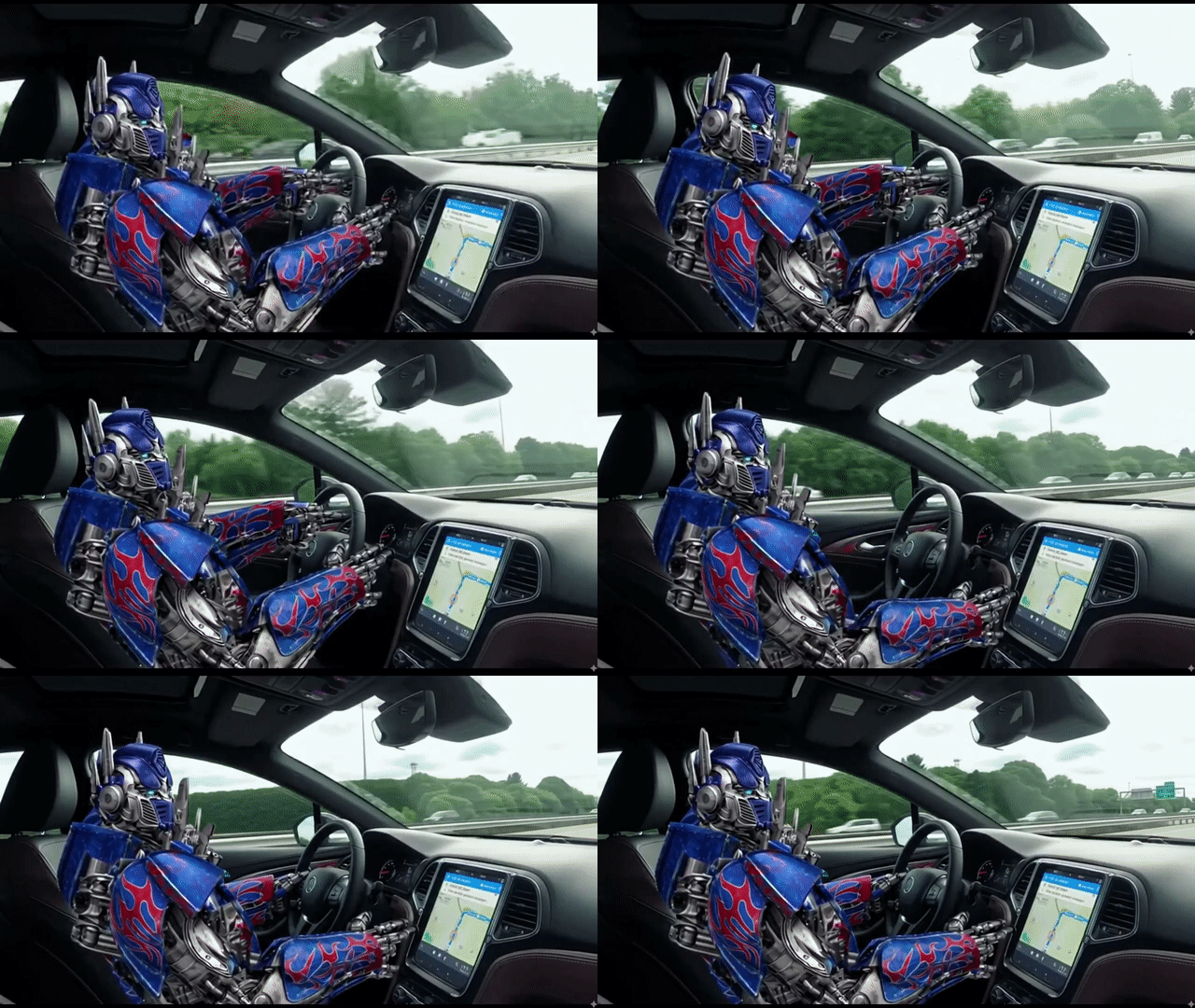 |
This is the “apply your words to edit video” moment — closer to Nano Banana, but for moving images.
Stronger Text and Formula Coherence
The chalkboard formula demo matters because readable text is still one of AI video’s hardest problems. It tests handwriting, symbols, timing, and meaning at once — useful for education, tutorials, and explainers.
| Prompt (input) | Output video |
|---|---|
| A professor demonstrates a mathematical proof for trigonometric identities on a classic chalkboard, detailing the step he is currently working on in the equation. |
Beyond keeping on-screen text readable, it also preserved complex formula structure — which makes knowledge-heavy videos far more believable.
Object and Scene-Level Editing
Creators often do not want a whole new video. They want one object changed without destroying the rest of the shot.
| Prompt (input) | Input video | Output video |
|---|---|---|
| Replace the spaghetti in both people’s plates with creamy pumpkin soup. Keep everything else the same. |
It replaced only the food while keeping plate framing, motion, and the rest of the scene stable.
Video Remixing
Remixing makes Gemini Omni useful after the first draft: take existing clips and turn them into a new version while keeping structure or creative direction.
| Video inputs | Prompt (input) | Output video |
|---|---|---|
| Combine the “girl walking by the sea” clip with the product clip to create a cinematic TVC-style advertisement, blending lifestyle beauty shots with polished product visuals to deliver a premium, elegant skincare commercial. |
World Knowledge-Aware Creation
Gemini Omni’s value also comes from knowing what a scene means, not only what it looks like — helpful for historical scenes, educational explainers, and product demos.
| Prompt (input) | Output video |
|---|---|
| Create a video about Steve Jobs’ life story. |
Gemini Omni vs Sora 2 vs Veo 3
| Feature | Gemini Omni | Sora 2 | Veo 3 |
|---|---|---|---|
| Core direction | Conversation-led video creation | Cinematic video generation | Polished Google video generation |
| Best strength | Editing and remixing through chat | Realism, motion, and audio | Native audio and creative control |
| Workflow | Generate, revise, and reshape | Generate finished clips | Generate with production controls |
| Inputs | Prompts, references, clips, templates | Text and image prompts | Text and image prompts |
| Text handling | Strong focus on writing and formulas | Still a harder area | Not the main public focus |
| Creator fit | Iterative edits and remixing | Cinematic social videos | Ads, clips, and Google workflows |
What stands out is that Gemini Omni is less about the first clip and more about what happens next. Sora 2 and Veo 3 can produce impressive videos, but Omni feels closer to how creators actually work: make something, notice what is off, ask for a change, keep the solid parts, and push closer to the brief.
What Gemini Omni Could Mean for Creators
Gemini Omni’s biggest promise is not just speed — it is reducing the pain of revision.
- Marketing teams — Product scenes, ad concepts, and campaign variations become easier to test without rebuilding every clip.
- Short-format creators — Existing clips can be remixed into new styles or formats through simple instructions.
- Teachers — Blackboard-style videos, formulas, diagrams, and lesson clips become more practical when text stays readable.
- Product teams — Demo videos and concept mockups can be adjusted faster when a product, background, or use case changes.
- Animation creators — Stylized motion and character-driven shots become easier to direct through prompts and follow-up edits.
- Agencies — Client revisions feel less like a full restart and more like a guided creative conversation.
Possible Limitations and Open Questions
Gemini Omni still leaves a few product-level questions.
The workflow can feel new for users who are used to separate tools for generation, editing, and remixing. Template design, editing history, version control, and project organization also matter for serious production.
There are practical questions around choosing the right input mix. A simple prompt may be enough for some videos, while deliberate results will likely need stronger references, clearer style direction, or follow-up instructions.
These are not deal-breakers — they are natural questions around a model that changes how video creation is organized.
Create Complete Content with Van Gogh Studio Agent
Gemini Omni points to a more conversational future for AI video. But marketing teams often need more than a strong model — they need a complete video with scenes, pacing, structure, and a clear message. That is where Van Gogh Studio Agent fits.
With Van Gogh Studio Agent, brand and social-first teams can turn an idea, prompt, image, URL, or product brief into a publish-ready video in one workflow.
Practical paths include the AI UGC video generator for testimonial-style ads, AI video explainer for features or complex ideas, and the story video maker for scripts and brand narratives.
Final Verdict
Gemini Omni matters because it points to a more natural way of making video: give the model context, describe what should happen next, and let the video evolve — instead of choosing between text-to-video, image-to-video, remixing, or editing as separate islands.
That is the bigger shift: AI video moving from one-time generation to conversation-led creation. Van Gogh Studio offers a video agent workflow for creators who want to take that idea through to complete, publish-ready content.
FAQs
What inputs does Gemini Omni accept?
Text prompts plus optional multimodal references — images, existing clips, audio cues, and templates — treated as one creative brief.
What outputs does Gemini Omni produce?
Generated, edited, or remixed video clips you can keep refining through chat instead of rebuilding from scratch.
How is Gemini Omni different from Sora 2 or Veo 3?
Sora 2 and Veo 3 are strong at generating impressive finished clips. Gemini Omni is stronger when you need an edit/remix loop after the first take.
Can I try Gemini Omni on Van Gogh Studio?
Yes — open Gemini Omni inside AI Video Studio and generate with free signup credits.
Create AI videos free
Try Van Gogh Studio free — text-to-video, image-to-video, and 300+ models in one place. Free credits on signup, no credit card required.
Try Free Video Generator


