

I tried VideoGen to see whether it really delivers on its promise: turning scripts, URLs, articles, and written ideas into narrated videos without starting from a blank editing timeline.
In this VideoGen review, I’ll share what it does well, where it feels limited, who it fits best, and why I would choose Van Gogh Studio when I need a clearer path from idea to publish-ready video.
Quick Verdict
VideoGen is a useful AI video generator if your main goal is fast faceless drafts from written content. URL-to-video, AI voiceover, captions, and browser editing make it easy to turn blogs, scripts, and pages into simple narrated clips.
It is a weaker choice when you need cinematic scenes, product-focused motion, campaign-ready ads, or deeper creative control over pacing and visual storytelling. Many outputs feel assembled rather than directed. For a fuller production workflow, I prefer Van Gogh Studio.
| Review Point | My Take |
|---|---|
| Best for | Fast faceless videos, blog-to-video drafts, and simple explainers |
| Not best for | Polished campaigns, cinematic ads, or tightly directed product videos |
| Strongest feature | Turning URLs and scripts into quick narrated drafts |
| Biggest limitation | Generic B-roll and draft-level polish that still needs heavy cleanup |
| Learning curve | Easy for beginners and content teams |
| My verdict | Useful for speed; limited as a full creative studio |
What Is VideoGen?
VideoGen is built around speed and content repurposing. Instead of starting from a traditional timeline, you create videos from ideas, scripts, URLs, documents, and other written inputs, then pair them with AI voiceovers, captions, B-roll, and light browser editing.
Its biggest value is making video easier for people who already have text. Creators, educators, and marketing teams can turn articles, landing pages, and short scripts into watchable drafts without filming or hiring editors.
Compared with open-ended AI video generators, VideoGen feels more like an assembly workflow. It is less about directing cinematic scenes from scratch and more about turning prepared content into a narrated clip.
Key Features I Reviewed
VideoGen’s feature set is organized around written-input video creation: URL and script intake, narration, captions, visual assembly, and team sharing.
URL to Video

The URL-to-video workflow is one of VideoGen’s most practical features. I found it useful when I already had a blog post, product page, article, or landing page and wanted a video version without rewriting everything by hand.
This worked best for explainer content, educational summaries, and tutorial-style clips. The source URL gives the tool a topic and structure, so the first draft usually feels more grounded than a vague prompt.
VideoGen often follows the source content in a straightforward way, but it does not always know which points deserve emphasis, which sections should be cut, or where the hook should land. For a public-facing product video ad, I would expect to rewrite and tighten the draft before publishing.
AI Voiceover
VideoGen’s AI voiceover makes the platform more useful than a silent draft generator. For faceless videos, narration is often the backbone of the piece, so having voiceover inside the workflow keeps production simple.
I found this useful for training-style clips and short social videos where the voice carries the story. It also helps if you do not want to record your own audio for every small project.
The voiceover is fine for simple information delivery. For sales-focused videos or UGC video ads, I wanted more personality, stronger emphasis, and better rhythmic pacing before I would publish.
Captions and Subtitles
Captions matter for short-form video, so I liked that VideoGen keeps subtitles inside the creation flow. Drafts are easier to watch without sound, and the message feels more structured on mobile.
This helps for social clips, training videos, and YouTube-style explainers where viewers often skim before committing. Built-in captions also save a step compared with exporting and adding text elsewhere.
Captions are not the flashiest feature, but they make VideoGen more practical for everyday publishing.
B-Roll and Visual Assembly
VideoGen can pair narration with supporting B-roll and visual scenes. That is useful when you want a quick faceless video, summary clip, or informational piece where visuals mainly support the spoken message.
It works for simple marketing drafts and story-style explainers when originality is not the priority. If the goal is to make a topic watchable, VideoGen can get you to a basic draft quickly.
The problem is relevance. Some scenes support the narration; others feel like filler. When I reviewed drafts as publishable assets, this became the biggest weakness: the video can look assembled rather than directed.
Browser-Based Editing and Team Workspace
VideoGen’s browser-based editing keeps the tool accessible. I did not need to install software or open a heavy timeline just to adjust a simple draft.
That makes it a solid fit for quick edits, social revisions, and content repurposing. Collaboration features such as project sharing, view links, and team workspaces also help when more than one person needs to review or approve a video.
The limit is that collaboration does not raise the quality ceiling. Sharing a draft is convenient, but if pacing, visuals, or structure still need work, the team still has to improve the video manually.
Pros and Cons
What I Liked
- Easy beginner-friendly path from script, article, or URL to a narrated draft
- Useful URL-to-video workflow for content repurposing
- Built-in AI voiceover helps faceless video production
- Captions support silent social viewing
- Browser editing and team sharing simplify review loops
What Held It Back
- Visuals often feel generic or loosely matched to the script
- Limited creative control over scene design, motion, and visual direction
- Pacing and hooks usually need heavy cleanup before publishing
- Weak fit for campaign ads, product motion, or cinematic storytelling
- Draft quality can stall once the project needs brand-level polish
Create Full Videos with Van Gogh Studio Free
Where VideoGen Falls Short
VideoGen’s limits show up when the video needs stronger visual direction, tighter pacing, and less generic scene selection.
Draft Quality Stays Draft-Level
VideoGen works best when speed matters more than control. It can turn an article, script, or URL into a basic narrated video faster than starting from scratch.
A public-facing video still needs a strong hook, intentional pacing, relevant visuals, and a structure that fits the platform where it will be posted. VideoGen helps assemble content, but the result often needs substantial editorial cleanup before it feels ready to publish.
Visuals Can Feel Irrelevant or Repetitive
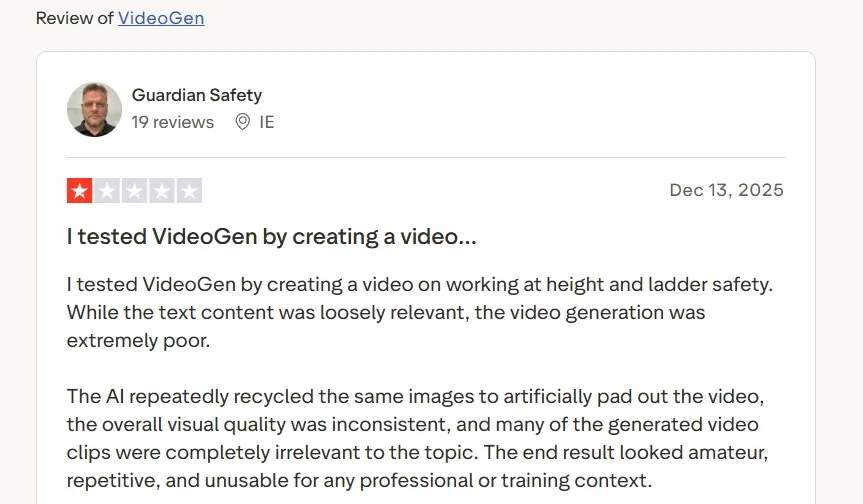
User feedback lines up with what I saw in testing. On Trustpilot, VideoGen has a mixed profile around 2.8 out of 5. Positive reviewers mention ease of use and speed. Critical reviewers report irrelevant visuals, recycled B-roll, awkward scene choices, and results that do not follow the script closely enough.
That matters for professional training, branded content, and any video that needs to look intentional rather than auto-assembled.
Limited Creative Range Beyond Narrated Assembly
VideoGen can feel restrictive when the project needs more than voiceover plus stock-style support footage. Campaigns often need stronger scene design, richer motion, product close-ups, or platform-native energy.
This becomes obvious with product ads, cinematic clips, social campaigns, and story-driven content. The workflow does not always give enough room to build videos that look visually distinct.
Real Use Cases
| Use Case | My Take |
|---|---|
| Faceless social videos | Solid fit for quick narration-led clips, though visual style can feel plain |
| Blog to video | Useful for turning articles into simple drafts that still need tightening |
| Educational explainers | Works when the topic is clear and narration-first |
| Training videos | Decent for rough drafts; weaker when visuals must stay tightly on-topic |
| UGC-style ads | Limited fit — can rough out a scripted angle, but pacing and visuals often feel generic |
| Product videos | Weak for visual product storytelling; better at explaining than selling through motion |
| Team review workflows | Helpful when teams need shared links and browser access |
VideoGen vs Van Gogh Studio
| Dimension | VideoGen | Van Gogh Studio |
|---|---|---|
| Main workflow | Fast narrated drafts from URLs and written content | Full AI video generation, editing, and publish-ready workflows |
| Starting input | Script, idea, URL, or document | Text, images, clip inputs, URLs, and assets |
| Video models | No clear multi-model choice for users | Access to leading models like Veo 3.1, Kling 3.0, and Seedance 2.5 |
| Creative depth | Better for simple narrated drafts | Stronger for controlled AI video generation |
| Marketing output | Rough drafts more than campaign creatives | Stronger with UGC ad video and campaign-ready workflows |
| Editing flexibility | Basic browser-based adjustments | Stronger follow-up refinement with the AI video editor |
| Best fit | Teams that need quick content-to-video drafts | Creators and marketers who need finished AI videos, not only assemblies |
Why Van Gogh Studio Is a Better VideoGen Alternative

VideoGen is useful for turning written content into a narrated draft. Van Gogh Studio is stronger when I want an AI creative suite that can support many video styles, editing, talking avatars, and audio in one place.
Broader AI Video Generation, Not Only Assembly

Van Gogh Studio gives me more starting points: text to video for concepting, image to video for product stills, and multi-model access when I want different motion styles. Models such as Veo 3.1, Kling 3.0, and Seedance 2.5 matter when one look is not enough.
That matters after using VideoGen, where the workflow often stops at stock-style B-roll assembly. With Van Gogh Studio I can guide scenes more intentionally instead of accepting loosely matched filler footage.
Post-Ready Videos With Van Gogh Studio Agent

Van Gogh Studio Agent gives a stronger end-to-end production advantage. Instead of only assembling a draft, it is designed to create structured, production-ready videos with less manual editing.
I can start from an idea, text, image, or URL, and the Agent can help handle structure, pacing, visuals, and sound. That makes it more suitable when I want a finished result instead of a basic generated clip that still needs assembly.
It also supports more content directions — viral video cloning, UGC ads, story videos, anime videos, music videos, and news-style videos — so the workflow stays adaptable for real publishing tasks.
Create Videos with Van Gogh Studio Agent
Stronger Marketing and Commerce Workflows
For ads, launches, and product promos, I need hooks, variations, pacing, and channel-ready formats. Van Gogh Studio’s marketing and product-video workflows are built for that campaign output, not just a narrated summary. URL-to-video and photo-to-video paths also help teams move from assets to ads faster via link to video and UGC ad video.
Avatar Videos Inside a Full Production Flow

With Van Gogh Studio’s AI avatar video generator, I can turn one photo into a lip-synced talking avatar with natural expressions and gestures — without filming or long avatar training.
The difference is context. I do not want the avatar or the voiceover to be the whole workflow. After the presenter or narration clip is ready, I can keep building the video with text-to-video scenes, product motion, captions, and prompt-based edits instead of stopping at a talking head or a B-roll montage.
Create Avatar Videos with Van Gogh Studio Free
Better Post-Generation Editing
Van Gogh Studio also gives me a practical way to keep improving a video after generation with its AI video editor. That matters because AI video creation rarely ends with the first result.
I can refine direction, adjust the final look, clean up distracting objects, and move the output closer to the version I want to publish. Generation and refinement stay connected in the same creative process.
Final Verdict: Is VideoGen Worth Using?
VideoGen is fast, accessible, and helpful for users who want to turn written content into a simple narrated video without filming or heavy editing. For faceless drafts, blog-to-video experiments, and basic explainers, that is genuinely useful.
Creative range is the main issue. VideoGen is not a strong choice for cinematic videos, product ads, ecommerce visuals, UGC-style campaigns, or content that needs tightly directed visuals.
For a broader AI video workflow, I would choose Van Gogh Studio. It combines multi-model video generation, editing, Agent-led publish-ready workflows, marketing tools, and AI avatars in one place — so you can explain, sell, and create without switching platforms.
VideoGen Review FAQs
Is VideoGen good for faceless YouTube videos?
Yes for quick drafts. VideoGen can turn scripts or articles into narrated clips with captions and B-roll. For polished long-form publishing, expect to rewrite hooks, trim pacing, and replace weak visuals.
Does VideoGen support URL to video?
Yes. URL-to-video is one of its strongest practical features for turning blogs, landing pages, and articles into first-pass video drafts.
What is the biggest drawback of VideoGen?
For me, the biggest drawback is draft-level quality: generic or loosely matched visuals, flat pacing, and limited creative control. Speed is real, but public-facing polish often still falls on the user.
What is the best VideoGen alternative?
If you want content-to-video speed plus a complete AI video workflow, Van Gogh Studio is the better alternative. It covers multi-model generation, AI avatar, editing, UGC ads, and longer story videos in one workspace.
Create AI videos free
Try Van Gogh Studio free — text-to-video, image-to-video, and 300+ models in one place. Free credits on signup, no credit card required.
Try Free Video Generator


