

SocialSight is worth trying if you want an AI video generator for short social clips, viral-style formats, UGC videos, and quick visual experiments. But it still needs review when prompt accuracy, motion tuning, brand consistency, or campaign structure matters. I liked it most when I needed fast content ideas for TikTok, Reels, or Shorts.
Quick Verdict
SocialSight is worth trying if you need a fast AI video generator for social content, trend-based clips, frame-to-video workflows, and UGC-style videos.
It works best when speed matters more than deep production control. But prompt accuracy, output consistency, and campaign-ready structure still need review.
For broader AI marketing video creation, Van Gogh Studio is the best SocialSight alternative to consider.
| Review Criteria | Verdict |
|---|---|
| Social Video Creation | Strong fit for bite-size clips, trend testing, and social-first ideas. |
| Multi-Model Access | Useful for testing different visual styles without switching platforms. |
| Frame-to-Video | Practical when users want more control over the start and end of a scene. |
| UGC-Style Videos | Helpful for quick product review formats and social ad testing. |
| Creative Effects | Useful for eye-catching clips, but not always enough for full campaign videos. |
| Best Fit | Creators, social media managers, small brands, agencies, and trend-focused Marketing teams. |
What Is SocialSight AI?
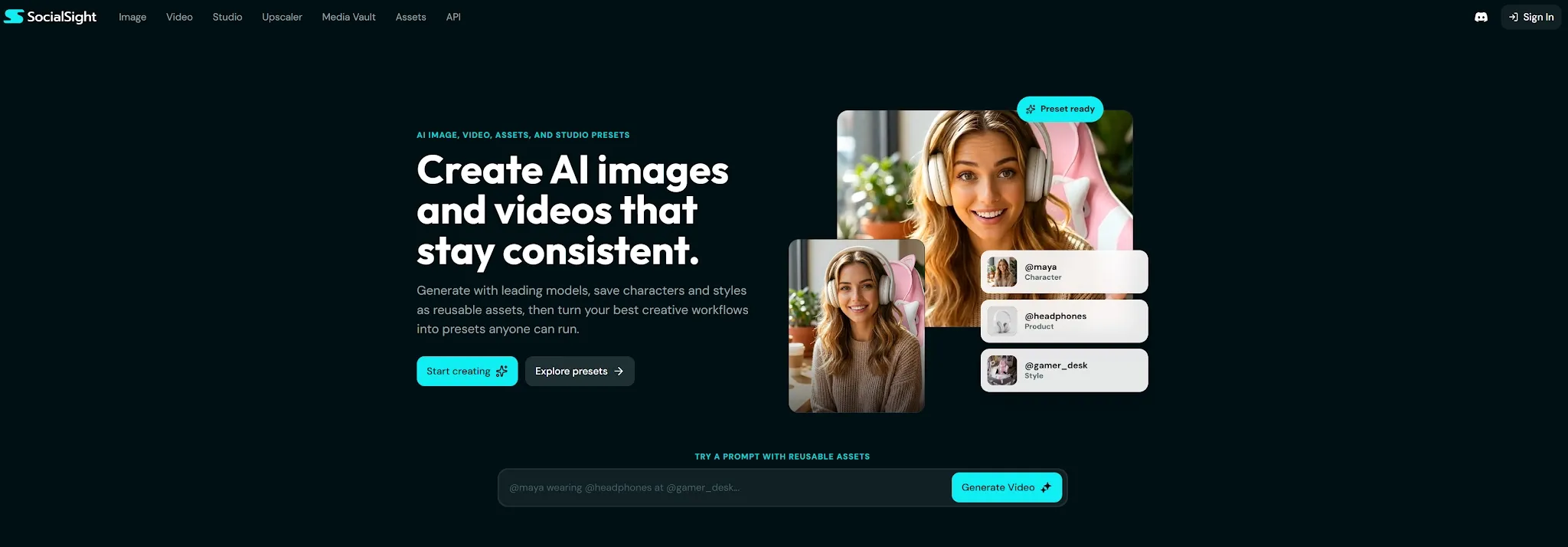
SocialSight is an AI video generator built for users who want to create short, social-ready videos without a traditional editing workflow.
The goal is not long-form production. Instead of starting with a blank timeline, SocialSight gives users templates, viral content ideas, effects, image-to-video tools, and access to multiple AI video models. It is fast content creation for social platforms.
That makes SocialSight different from a classic video editor.” It is asking something closer to, “What kind of social video do you want to test next? It is not mainly asking, “How do you want to edit this clip?”
In hands-on use, SocialSight felt most useful when I needed quick creative directions. It worked better for trend-driven clips, UGC-style drafts, and visual experiments than for structured campaign videos.
How I Tested SocialSight AI Video Generator
I evaluated SocialSight AI around the use cases it seems built for: quick-format video creation, multi-model testing, frame-to-video generation, anime-style video workflows, viral templates, effects, and UGC-style content.
I looked at whether the result could support a real content task. I did not judge it only by whether the output looked fun. A social clip needs to catch attention fast, but it also needs enough structure to be useful.
SocialSight performed best when the task was light, visual, and trend-based. So I paid attention to motion, prompt following, visual consistency, platform fit, and how much editing the output would still need. It felt less reliable when I needed a precise scene or a polished ad structure.
What Are SocialSight’s Best Features?
SocialSight’s best features are multi-model video generation, frame-to-video control, viral content formats, and UGC-style video creation.
Multi-Model Video Generation
It lets users test different AI video models inside one platform. SocialSight’s multi-model setup is one of its most useful features. Others may feel stronger for anime, product clips, or stylized social content. That is helpful because one model rarely handles every visual style well. Some outputs may look better for motion.
I found this useful when I wanted to compare creative directions quickly. Instead of committing to one output style, I could test the same idea in different ways and pick the one that felt more engaging.
The limit is predictability. If you need a strict brand look, you may still need extra review. More model choice gives more options, but it can also make results feel less consistent.
Multi-model access is valuable, but it does not remove the need for creative judgment.
Frame-to-Video Generation
You can use a starting image and an ending image to guide how a scene changes. SocialSight’s frame-to-video workflow is useful when you want more control than a pure text prompt gives you. This makes the video feel more intentional, especially when the goal is a transformation, product reveal, or before-and-after style clip.
I liked this feature because it reduces some of the randomness that comes with text-to-video generation. You give the AI a visual direction, not just a written instruction.
Product shapes, faces, and small visual details may shift during the transition. Even with start and end frames, the movement between them can still feel unpredictable. The weak point is motion quality.
For social drafts, that may be fine. For polished product marketing, I would review the output carefully.
Viral Content Library and Effects
Instead of making users invent every format from scratch, it surfaces trend-style ideas, effects, and visual concepts that fit platforms like TikTok, Instagram Reels, and YouTube Shorts. This is where the platform feels very social-first. SocialSight’s viral content library is useful for creators who need ideas quickly.
That helps reduce the “what should I make today?” problem. A creator can start from a proven format and adapt it to a product, topic, or character.
The limitation is originality. If too many users follow the same formats, the final videos may need stronger hooks or more personal direction to stand out. Trend-based content can move fast, but it can also look familiar.
So I would treat the viral library as a starting point, not the full creative answer.
UGC-Style Video Generation
This can work for product reviews, lifestyle demos, creator-style promos, and fast ad concepts. SocialSight’s UGC-style video generation is useful for brands and Marketing teams who want social-native content without filming. It gives teams a way to test different hooks and visual angles before spending more time or budget on production.
I found this most useful for early creative testing. You can explore a few directions, see what feels promising, and then decide which idea deserves more polish.
The limit is structure. A real campaign usually needs a stronger narrative flow, voiceover, product positioning, and final edit. SocialSight can help create UGC-style clips, but the output may still feel more like a draft than a finished ad.
What Are SocialSight’s Pros and Cons?
SocialSight is strong for fast social video creation, but it has clear limits.
Pros:
- Good for short-form social videos
- Useful multi-model access
- Helpful frame-to-video workflow
- Strong for trend-based ideas
- Useful for UGC-style drafts
- Easy for creators and small teams
Cons:
- Output consistency can vary
- More options do not always mean more control
- Motion between frames still needs review
- Viral formats can feel familiar
- Not always structured enough for polished ads
- Brand-sensitive content needs careful checking
Where Does SocialSight Fall Short?
SocialSight falls short when you need precise control, consistent outputs, or a full marketing production workflow.
Prompt Accuracy Can Be Uneven
SocialSight AI can generate social clips quickly, but the output does not always follow the prompt exactly. A clip can look interesting while still missing the thing you actually asked for. This matters when your idea depends on a specific product, action, character, or visual detail.
For casual exploration, that may be acceptable. For brand content or paid ads, it can create extra review work.
So the tool works best when the brief is flexible. If the output needs to match a detailed direction, you may need several attempts.
Trend-Based Content Can Feel Repetitive
SocialSight’s viral content library is useful, but it can also create a sameness problem. Trend formats help users move faster. But if the final output stays too close to the template, it may not feel distinctive. They give creators a starting point and reduce creative friction.
This is not a major issue for quick experiments. It matters more when the goal is brand recall or paid campaign performance.
A viral format is only useful if the hook, message, and visual angle still feel specific to your brand.
It Is Not a Full Campaign Workflow
SocialSight is useful for quick clips, effects, and social drafts. A campaign usually needs more than one viral-style video.But it does not feel like a complete marketing production system. You may need UGC ads, product videos, multiple hooks, voiceovers, image assets, platform formats, and a clearer narrative structure.
SocialSight can support early ideation. But it may not be enough when the goal is polished, repeatable marketing content.
That is where a broader marketing video workflow becomes more useful.
Turn Social Ideas Into Real Campaigns
Create UGC ads, product videos, social clips, and campaign variants with a fuller AI marketing workflow.
Is SocialSight Right for You?
SocialSight is right for you if you need short social videos, trend-based clips, frame-to-video experiments, or UGC-style drafts. It makes sense for creators, social media managers, small brands, founders, and agencies that need to test ideas fast.
Skip it if you need strict prompt accuracy, polished ad structure, or a more complete campaign workflow.
The simple version is this: SocialSight is useful for fast social video ideas, but less complete for serious marketing production.
How Does SocialSight Perform Across Real Use Cases?
SocialSight performs best when the task is short, visual, and social-first.
| Use Case | My Take |
|---|---|
| TikTok and Reels Ideas | Strong fit for quick trend testing and visual experiments. |
| Frame-to-Video Clips | Useful when users want more control over scene direction. |
| UGC-Style Videos | Useful for early ad concepts, but final structure needs review. |
| Anime Image-to-Video | Useful for creators working with anime-style characters and visuals. |
| Visual Effects Clips | Useful for thumb-stopping social content. |
| Product Promos | Helpful for light concepts, but product details need checking. |
| Campaign Testing | Useful for rough variations, less complete for finished ad production. |
My Personal Take on SocialSight
Creators and marketers often do not need a perfect video first. I like SocialSight AI because it understands the pressure of social content. They need ideas, variations, and clips they can test quickly. SocialSight is good at that. It gives users formats, effects, models, and workflows that make bite-size content feel easier to start.
But I hit the limits when I looked at it as a marketing system. It can help you produce social clips, but it does not always give those clips enough structure, polish, or campaign logic.
My take is simple. It is not the only platform I'd pick for serious ad production. SocialSight is a useful AI video generator for fast social content and trend testing.
Why Is Van Gogh Studio a Better SocialSight Alternative?

Van Gogh Studio is a better SocialSight alternative if you want to move beyond fast social clips and build a more complete AI marketing video workflow.
But many Marketing teams need more than fast clips. SocialSight is useful for viral formats, UGC-style drafts, effects, and multi-model testing. They need ad-ready structure, product-focused videos, creator-style UGC, stronger narrative flow, and campaign variants that can be tested quickly.
A Stronger Marketing Workflow
That is where Van Gogh Studio feels more practical. Van Gogh Studio is the ultimate AI creative suite for marketers, creators, and sellers & brands, but for this use case, the biggest advantage is Marketing Studio.
Marketing Studio is built for ad and campaign content. It helps users create UGC-style videos, product videos, social ads, and campaign-ready creatives from scripts, images, product links, or ideas.
This matters because viral content is not always the same as marketing content. A clip can be eye-catching but still lack a clear hook, offer, product moment, or call to action.
More Model Choice for Video Creation
Van Gogh Studio also gives users access to many leading AI video models, including Seedance 2.5 and Gemini Omni Flash.
Some are better for realistic motion. That matters because one model rarely fits every video task. Some are stronger for cinematic scenes. Others are better for fast image-to-video or social clips.
For broader video creation, the AI video generator is useful. For photo-led social content, image to video AI gives a more direct path.
From Social Clips to Campaign Variants
SocialSight AI is well suited for fast social ideas. Van Gogh Studio becomes stronger when you want those ideas to turn into more complete campaign assets.
For early creative testing, marketers can turn scripts, product angles, or hook ideas into UGC video ads and script-to-UGC ads. This makes it easier to test creator-style openings, problem-solution angles, testimonials, demos, and offer-led versions without planning a separate shoot each time.
And when you want to move from an idea, script, image, or product link into a more finished video, Van Gogh Studio Agent is the stronger fit.
So the difference is simple. Van Gogh Studio is better when you need more model choice and a stronger marketing workflow for UGC ads, product videos, social campaigns, and repeatable creative production. SocialSight is well suited for fast social video testing.
Final Verdict: Is SocialSight Worth It?
SocialSight AI is worth trying if you need an AI video generator for social clips, viral formats, frame-to-video experiments, effects, and UGC-style drafts.
But SocialSight is not perfect. Prompt accuracy can vary, trend formats can feel familiar, and the output may still need structure before it works as real marketing content.
My verdict is simple. Use Van Gogh Studio when you need a broader marketing workflow for UGC ads, product videos, campaign variants, and publish-ready social content. Use SocialSight for short social video ideas and trend testing.
Create AI videos free
Try Van Gogh Studio free — text-to-video, image-to-video, and 300+ models in one place. Free credits on signup, no credit card required.
Try Free Video Generator


