

Kling AI has just released Kling 2.0 to the public.
Quick Verdict
Kling 2.0 launched with major upgrades and strong ranking claims. Hands-on, it competes with Runway Gen-4 and Veo-class models — excellent for quality clips, not automatically the best for every workflow.
| Point | Take |
|---|---|
| Best for | High-fidelity AI video, multimodal visual prompting, competitive quality tests |
| Not best for | One-click campaign videos without editing or packaging |
| Score | 8.3 / 10 |
| Better alternative | Van Gogh Studio |
This new release is packed with major upgrades, claiming the top spot in AI video rankings. But is it really as groundbreaking as it sounds?
We've put Kling 2.0 to the test, comparing it with other state-of-the-art models like Runway Gen 4 and Google's Veo 2.
We'll share the results in just a bit, but first, let's understand what makes Kling 2.0 special.
What's New in Kling 2.0?
Kling 2.0 has introduced several new features and changes.
Multi-Modal Visual Prompting
One of the strongest significant additions to the Kling ecosystem is the new "Multi Elements" feature.
It's a multi-modal visual prompting system that allows users to reference images and videos within text prompts. This feature represents a major advancement in control and precision, although it's currently separate from Kling 2.0 (with integration expected soon).
The system offers three primary functions:
- Swap: Replace subjects in existing videos (feature was experiencing errors during testing)
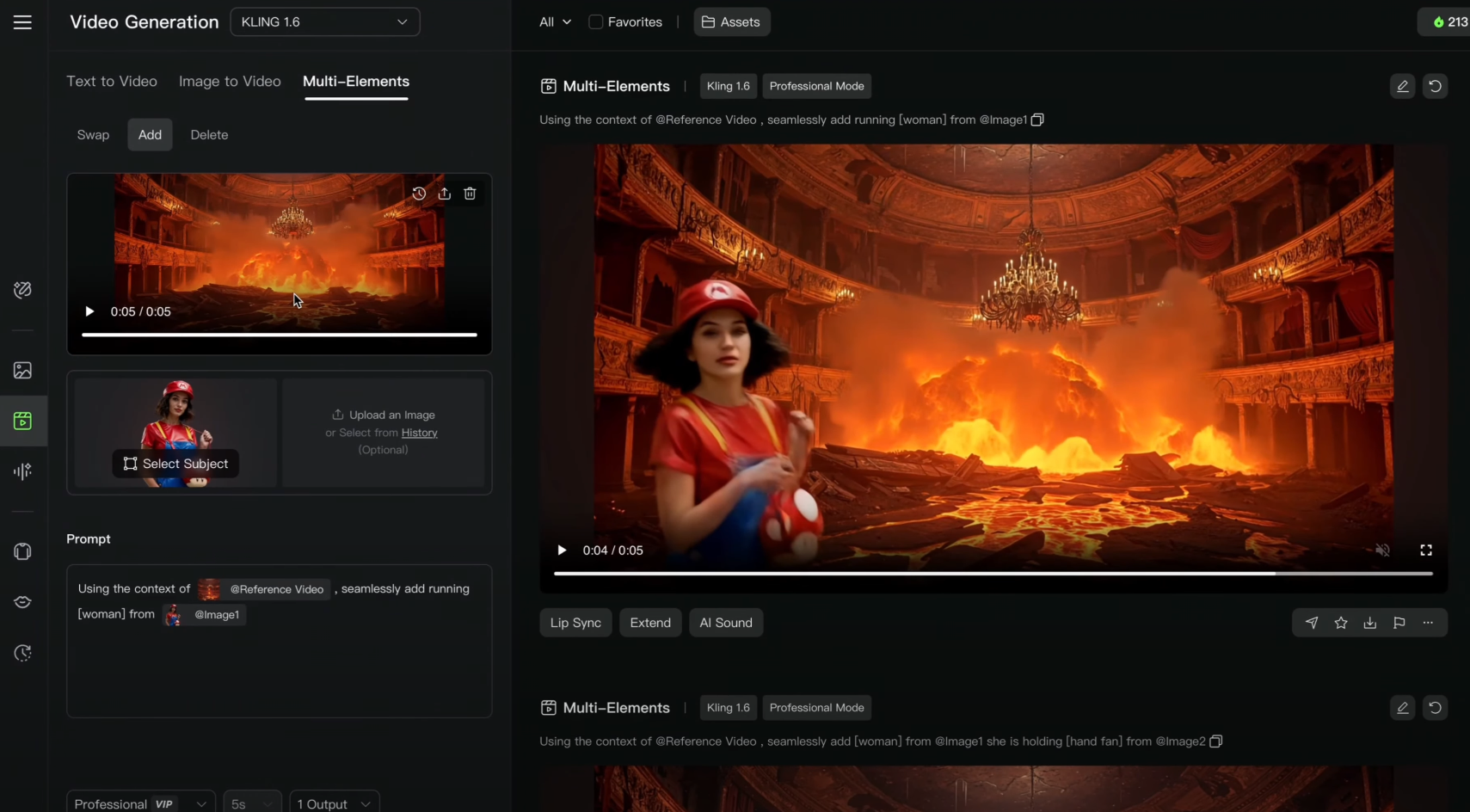
- Add: Insert new elements from reference images into videos
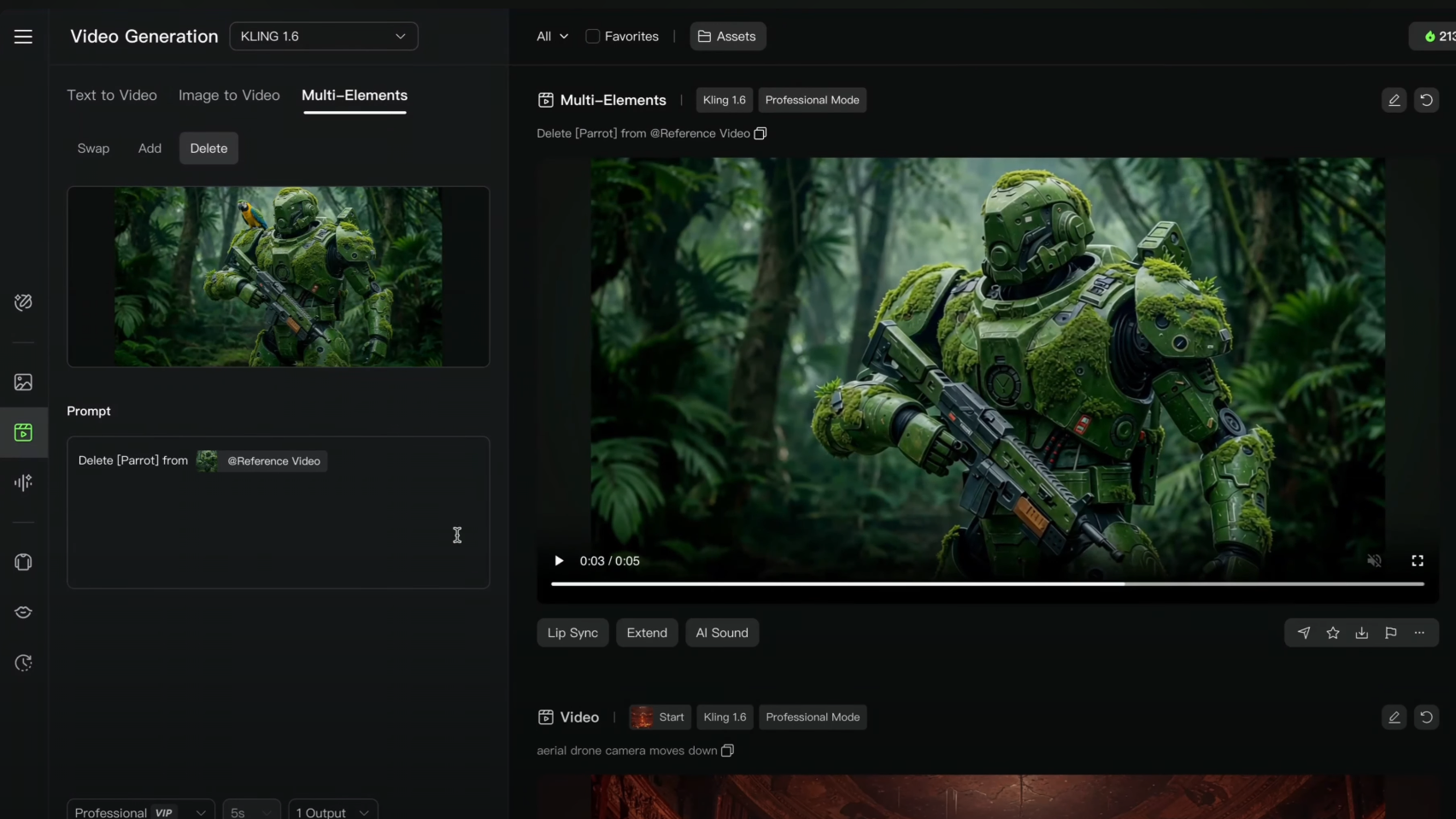
- Delete: Remove unwanted objects from scenes dynamically
In our tests, we successfully used the "add" feature to insert a running woman (from a reference image) into a scene of lava entering an old opera house.
Similarly, the "delete" function allowed us to remove a parrot from a robot's shoulder although maintaining visual coherence throughout the video.
Notably, Kling AI provides helpful prompt templates when uploading reference materials, eliminating the demand to memorize complex prompting structures—a thoughtful user experience improvement.
Interface and Workflow Changes
In this version, Kling AI has also introduced several interface changes:
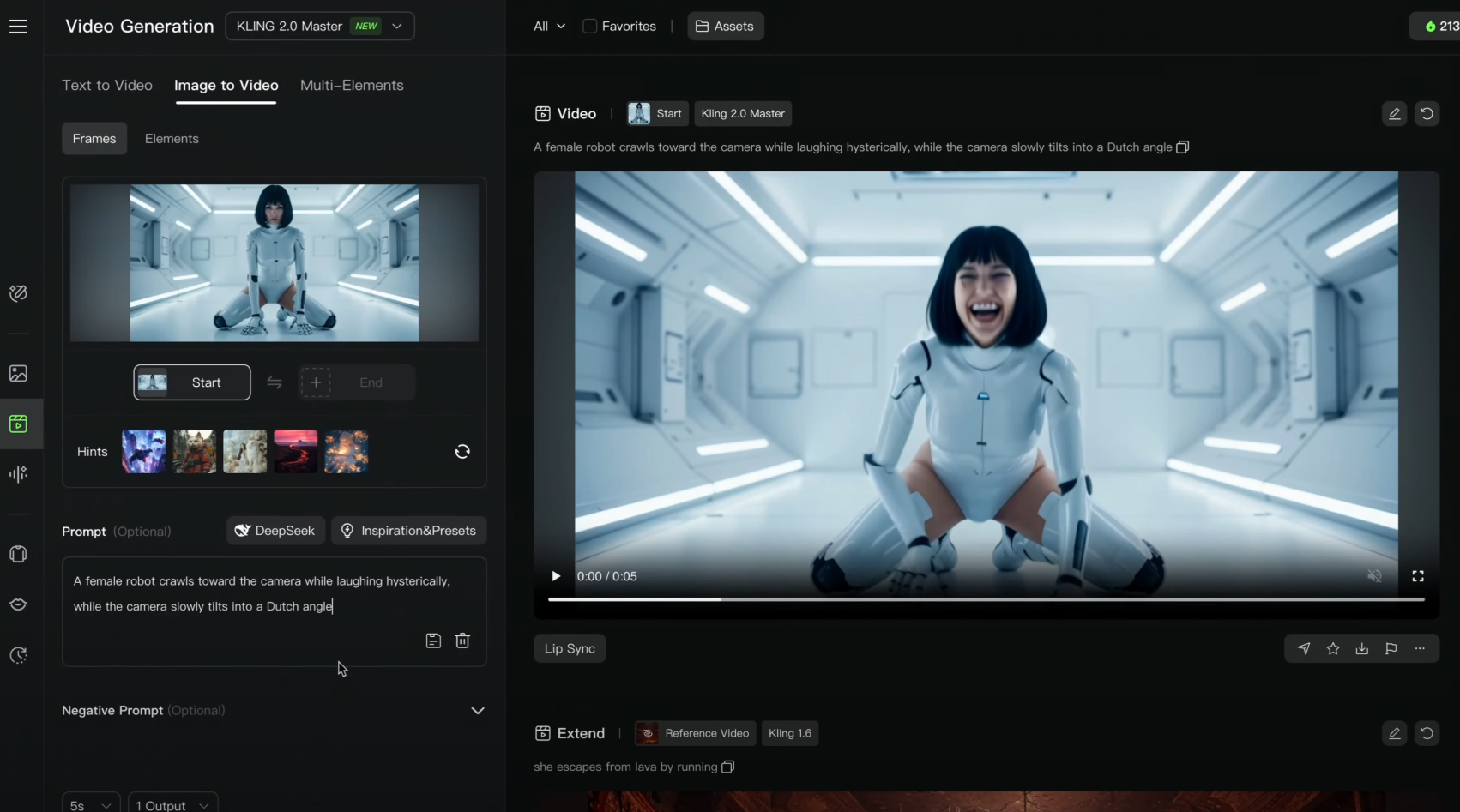
- The difference between "standard" and "professional" modes has been eliminated
- Creativity and prompt-following sliders are no longer present
- Frame mode is not supported at this time with Kling 2.0
- The original elements feature (used for character positioning and object references) is not yet functional with Kling 2.0
Kling 2.0 vs. Kling 1.6: What Has Improved?
Kling 2.0 excels in motion quality and physics simulation, but occasionally you may prefer Kling 1.6's scene coherence for specific projects.
Motion Fluidity and Naturalism
Kling 2. Animals move with natural fluidity instead of the jerky, unrealistic movements seen in Kling 1.0 dramatically improves motion quality.6.
Human expressions are extra convincing, eliminating the "moving lips without speaking" issue. Facial emotions appear natural and consistent throughout sequences.
Dynamic Scene Handling
Flying creatures reveal proper wing movements and natural gliding patterns. Kling 1.6's rigid flight paths are replaced with realistic aerial dynamics.
Environmental physics has improved significantly. Water effects, object interactions, and material properties behave additional realistically.
The Coherence Trade-off
Kling 2.0 produces more dynamic scenes but sometimes at the cost of coherence. Characters may appear or disappear unexpectedly in complex sequences.
Kling 1.6, even as less visually impressive, maintained better scene consistency throughout videos.
Prompt Understanding
Camera instructions like panning, tilting, and focus shifts execute with greater precision in Kling 2.0.
Sequential actions are better understood. Multi-part prompts like "chandelier falling into lava and bursting into flames" follow proper logical order.
Technical Limitations
Both versions struggle with hands, text rendering, and complex interactions, though 2.0 shows modest improvements in these areas.
Generation Parameters
Kling 2.0 eliminates the creativity/prompt-following sliders and combines standard/professional modes into a single interface.
This streamlined approach may benefit beginners but limits options for advanced users accustomed to fine-tuning their outputs.
Testing Kling 2.0
We wanted to see how Kling 2.0 stacked up against Runway Gen 4 and Google Veo 2.
So we did a series of tests on all three AI video generators using the same prompts.
Prompt Adherence and Motion Rendering Capabilities
Our first test focused on Kling 2.0's ability to understand and execute complex prompts involving both subject and camera motion. The task was simple yet challenging: a woman looks down at her hands, and a parrot lands on her hands.
Kling 2.0 did an impressive job of following the prompt to the letter. The action unfolded naturally, with a clear sequence of events.
Runway's output, on the other hand, missed the mark slightly. The parrot was already present when the woman looked down, which doesn't align with the prompt's requirements.
Google's Veo 2 followed the prompt but lacked the plain, sequential action that Kling 2.0 delivered.
Evaluating Environmental Effects: Flooding Simulation
Next, we tested Kling 2.0's ability to render environmental effects, specifically a flooding scenario in a city setting.
Kling 2.0 performed admirably, accurately depicting floodwaters filling the streets and pushing cars away.
Runway struggled with this challenge, opting instead to display a massive ocean wave that didn't fit the prompt.
Veo 2 managed to render the flooding but lacked dynamism and didn't fully capture the scenario described in the prompt.
Dynamic Action and Prompt Understanding in High-Speed Scenarios
We pushed Kling 2.0 further by testing its ability to handle high-speed action sequences. The task involved a woman galloping on a horse with the camera circling around her.
Kling 2.0 delivered a dynamic, visually appealing output, although it struggled slightly with maintaining facial coherence during the high-speed action.
Runway's output looked more like a slow-motion scene, lacking the high-speed dynamism we were aiming for.
Veo 2, unfortunately, didn't deliver usable results in this scenario.
Rendering Levitating Objects and Complex Camera Motions
In this test, we challenged Kling 2.0 to render a scene with levitating objects and a camera tilt-down motion.
Kling 2.0 excelled once again, accurately depicting the floating objects and following the specified camera movement. Runway and Veo 2 struggled with this task, failing to fully render the levitating objects and camera motion as described in the prompt.
The Ultimate Challenge: AI Video Models vs. Samurai Fight Scene
The final challenge was to render a fight scene between two samurais, a task that has historically proven difficult for AI video models.
Kling 2. The coherence of the swords decreased, especially when they interacted, and the overall scene didn't look as realistic as we hoped.0, even as improved over previous versions, even so struggled with rendering natural-looking fights.
Runway Gen 4 and Veo 2 faced similar issues, with coherence problems and a lack of natural movement in the fight scenes.
Benefits and Limitations of Kling 2.0
Overall, we think Kling 2.0 comes with the following pros and cons.
Kling 2.0 Strengths
- Prompt Adherence: Kling 2.0 shows remarkable adherence to complex prompts, especially those involving multiple actions and environmental effects.
- Realism in Interactions: The model excels in rendering subtle interactions and realistic movements, enhancing the overall visual quality.
Kling 2.0 Challenges
- Maintaining Coherence: Kling 2.0 struggles with coherence during high-speed and complex action sequences, leading to inconsistencies in the outputs.
- Rendering Complex Scenes: Despite improvements, Kling 2.0 even so faces challenges in rendering realistic fight scenes and dynamic camera motions.
Pricing and Accessibility
- Cost Implications: Kling 2.0's pricing, especially for short video generations, might be a concern for some users, indicating a want for additional affordable options.
Final Thoughts: Is Kling 2.0 Worth It?
Kling 2.0 represents a significant step forward in AI video generation, offering impressive improvements in adherence to complex prompts and rendering realistic interactions.
However, it still faces challenges in maintaining coherence during dynamic scenes. Despite its advancements, you should weigh the benefits against the current cost and the specific needs of their projects when considering Kling 2.0.
Note: This article was written based on the content of the following video:
Create AI videos free
Try Van Gogh Studio free — text-to-video, image-to-video, and 300+ models in one place. Free credits on signup, no credit card required.
Try Free Video Generator


