

I tested Kaze AI to see whether its prompt-based image workflow is useful for portraits, social visuals, product photos, background edits, and quick creative ideas — without learning a heavy design tool.
In this Kaze AI review, I’ll share what it does well, where single-image speed stops feeling like a full creative system, who it fits best, and why I would choose Van Gogh Studio when images need to become publish-ready video.
Quick Verdict
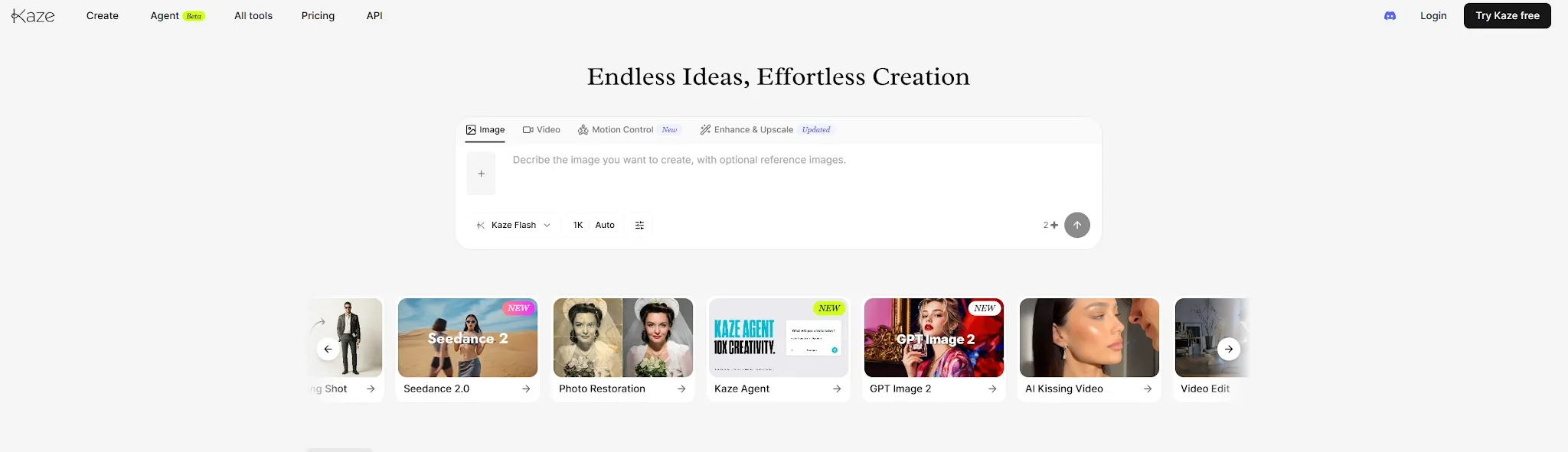
Kaze AI is a solid AI image tool if your main goal is quick visual creation, simple photo editing, and prompt-based image fixes. You can describe the edit you want, shift the background, clean up a photo, or create a polished portrait without learning a complex design app.
It is a weaker choice when you need strict brand control, deep model choice, campaign-level asset sets, or a path from stills into finished video ads. For that fuller production workflow, I prefer Van Gogh Studio.
| Review Point | My Take |
|---|---|
| Best for | Quick image generation, photo edits, portraits, and background cleanup |
| Not best for | Strict brand control, full campaigns, or video-first production |
| Strongest feature | Simple prompt-based visual editing for everyday image tasks |
| Biggest limitation | Single-image speed; less complete for repeatable commercial workflows |
| Learning curve | Beginner-friendly — easier than manual editing tools |
| My verdict | Useful for quick image fixes; limited as a full creative suite |
What Is Kaze AI?
Kaze AI is an AI image generator and editor built for people who want to create, edit, and improve images without using a traditional design tool.
Instead of giving you a blank canvas or a long editing panel, Kaze works more like a visual assistant. You upload an image, describe the change you want, and let the tool handle the first version for you.
That made Kaze useful for quick visual work in my tests. It helped me turn rough image ideas, casual photos, and simple product shots into cleaner visuals without spending time on manual edits. It is still image-first. If the end goal is AI video, product motion, or campaign creatives, Kaze is only part of the path.
Key Features I Reviewed
Kaze’s feature set is organized around prompt-based edits, generation, cleanup, and light enhancement.
Prompt-Based AI Editing
Prompt-based editing is the easiest part of Kaze. You can type a simple request like “make the background cleaner” or “turn this into a professional portrait,” and Kaze applies the edit for you.
I like this because it matches how normal users think. Most people think in outcomes, not editing steps. This makes Kaze useful for quick visual tasks: improve a profile photo, clean up a product image, or test a new style without opening a heavy design app.
The limit is precision. It works best when your instruction is clear and simple. If the prompt is too complex, Kaze may miss small details. If it is too vague, the result may look generic.
AI Image Generation
Kaze also works as an AI image generator. You can begin with a prompt and test different visual ideas when you do not already have the right image.
I found this helpful for social visuals, creative concepts, and quick design drafts. It lowers the pressure of starting from a blank page. Kaze still feels better for quick visual exploration than deep creative control or multi-model comparison.
Background and Object Cleanup
Kaze is useful for cleaning up distracting image elements — messy backgrounds, unwanted objects, simple text, or visual clutter. These are everyday problems for creators and small sellers.
This worked best with simple images: a plain wall, clean product shot, or clear portrait. Hair, hands, glass, shadows, and product edges can still look uneven. Complex images demand review before commercial use.
Image Enhancement and Portrait Edits
Kaze is helpful when you want an image to look sharper and more polished. It can improve clarity, lighting, and overall presentation for profile photos, old images, low-quality visuals, and casual product photos.
The portrait use case is especially easy to understand. Many users want a better profile photo without booking a shoot. I would still check the face carefully. If the result feels too smooth or too different, I would not use it for a serious profile. A decent AI portrait should still look like the real person.
Pros and Cons
What I Liked
- Easy to use with simple prompts
- Good for quick image generation
- Helpful for background cleanup on simple shots
- Useful for portraits and profile photos
- Good for casual and social visuals
- Beginner-friendly compared with traditional editors
What Held It Back
- Detailed edits may need several tries
- Not ideal for strict brand control
- Complex edges still need review
- Some results can look too AI-like
- Less complete than a full creative suite
- No strong path from image edits into publish-ready video
Create Full Videos with Van Gogh Studio Free
Where Kaze AI Falls Short
Kaze falls short when you need exact control, repeatable results, or a full content workflow beyond one image.
The Output Still Needs Review
Kaze is fast, but the first result is not always final. A product label may lose clarity. A background edge may look rough. A face may look slightly different. This is not a major problem for casual use, but it matters for commercial work where small details affect trust.
Prompt Quality Still Matters
Kaze feels simple, but your prompt still affects the result. A vague prompt gives the AI too much freedom. “Make the product photo brighter and keep the original label” is much better than “make it better.” The learning curve is not technical editing — it is visual direction.
It Is Not a Full Creative Workflow
Kaze is useful for single images. It does not feel like a full creative production system. If you need videos, talking avatars, ad-ready content, multi-scene stories, or campaign variations, you will need more than Kaze. Moving from cleaned stills into image to video, UGC ad video, or long video workflows requires a broader studio.
Real Use Cases
| Use Case | My Take |
|---|---|
| Social media images | Strong fit — helps create and polish simple visuals quickly |
| Profile photos | Strong fit when the source image is clear |
| Product images | Useful for light cleanup, but details need review |
| Background removal | Useful for simple images; complex edges need checking |
| Image enhancement | Helpful for improving weak or low-quality visuals |
| Marketing campaigns | Useful for single assets, not enough for full campaigns |
| Video ads and stories | Not the right tool alone; use a video-first workflow |
Kaze AI vs Van Gogh Studio
| Dimension | Kaze AI | Van Gogh Studio |
|---|---|---|
| Main workflow | Quick AI image generation and prompt-based photo edits | Full AI video generation, editing, and publish-ready workflows |
| Image editing | Core strength for simple cleanup and portraits | Stronger when images feed into video and campaign tools |
| Video generation | Not the product focus | Strong text to video and image to video paths |
| Creative range | Narrower single-image focus | Broader coverage across ads, explainers, social, and story videos |
| Marketing output | Better for one-off visuals than campaign sets | Stronger with UGC ad video and campaign-ready workflows |
| Editing flexibility | Prompt edits for stills | Stronger follow-up refinement with the AI video editor |
| Best fit | Creators and small sellers needing fast image fixes | Creators and marketers who need finished AI videos from visual assets |
Why Van Gogh Studio Is a Better Kaze AI Alternative

Kaze is useful for quick image edits. Van Gogh Studio is stronger when I want those visuals inside an AI creative suite that supports many video styles, editing, talking avatars, and campaign formats in one place.
From Cleaned Stills to Motion and Product Clips

Van Gogh Studio gives me more starting points: text to video for concepting, image to video for product stills and portraits, and multi-model access when I want different motion styles. Models such as Veo 3.1, Kling 3.0, and Seedance 2.5 matter when one look is not enough.
That is the clearest gap versus Kaze. Kaze can clean a photo; Van Gogh Studio can explore how that asset moves in a video.
Avatar Videos When Portraits Need a Presenter

With Van Gogh Studio’s AI avatar video generator, I can turn one photo into a lip-synced talking avatar with natural expressions and gestures — without filming or long avatar training.
Kaze can polish a portrait as a still. When a project needs a presenter clip inside a larger video — product explainers, UGC-style pitches, training intros — avatars next to video generation are more practical than stopping at a headshot edit.
Create Avatar Videos with Van Gogh Studio Free
Post-Ready Videos With Van Gogh Studio Agent
Van Gogh Studio Agent gives a stronger end-to-end production advantage. Instead of polishing separate images, it is designed to create structured, production-ready videos with less manual assembly.
I can start from an idea, text, image, or URL, and the Agent can help handle structure, pacing, visuals, and sound. That makes it more suitable when I want a finished result instead of a cleaned still that still needs another tool.
It also supports more content directions — viral video cloning, UGC ads, story videos, anime videos, music videos, and news-style videos — so the workflow stays adaptable for real publishing tasks.
Create Videos with Van Gogh Studio Agent
Stronger Marketing and Commerce Workflows
For ads, launches, and product promos, I need hooks, variations, pacing, and channel-ready formats. Van Gogh Studio’s marketing and product-video workflows are built for that campaign output, not just one improved product photo. URL-to-video and photo-to-video paths also help teams move from assets to ads faster via link to video and UGC ad video.
Final Verdict: Is Kaze AI Worth Using?
Kaze AI is worth trying if you want a simple AI image generator and photo editing tool for portraits, social visuals, background cleanup, and quick creative drafts.
It is not the best choice for full creative production. If your work includes brand visuals, ads, product assets, videos, and multiple content formats, Van Gogh Studio is the stronger option.
Use Kaze when a fast image fix is the job. For a broader path from visual assets to publish-ready videos, I would choose Van Gogh Studio. It combines multi-model video generation, editing, AI avatars, Agent-led workflows, and campaign tools in one place.
Kaze AI Review FAQs
Is Kaze AI good for quick photo edits?
Yes. Kaze AI is one of the easier options for prompt-based cleanup, portrait polish, background changes, and simple image enhancement without learning a full design tool.
Can Kaze AI create AI images from text?
Yes. Kaze works as an AI image generator for social visuals, creative concepts, and quick design drafts. It is better for exploration than for deep multi-model control.
What is the biggest drawback of Kaze AI?
For me, the biggest drawback is that single-image speed does not equal a full creative workflow. Product details, faces, edges, and brand-sensitive visuals still need review, and video campaigns need another tool.
What is the best Kaze AI alternative?
If you want image edits plus a complete AI video workflow, Van Gogh Studio is the better alternative. It covers image to video, text to video, AI avatar, editing, UGC ads, and longer story videos in one workspace.
Create AI videos free
Try Van Gogh Studio free — text-to-video, image-to-video, and 300+ models in one place. Free credits on signup, no credit card required.
Try Free Video Generator


