

If you want to be able to create realistic AI videos on Kling AI that feature you or anyone else of your choosing in the starring role, with the strongest true-to-life movements and details, Kling AI’s Face Model feature could be for you.
This feature lets users essentially upload videos of themselves or someone else to train the AI and teach it all about how they look, talk, and express themselves. They can then apply the AI-generated models of themselves to create engaging AI videos in various forms.
In this article, we'll help you learn how to use Kling AI's Face Model.
How to Use Kling AI Face Model: A Beginner’s Guide
Next, let’s look at how to leverage Kling AI Face Model, with step by step instructions you can follow to produce your own model. Just note that, at this time, Face Model is only available in the Pro and Premier plans of Kling AI, so free users will not have access to it.
Step 1. Access the Tool
First, open Kling AI, log in, and click on the “AI Custom Model” feature in the sidebar on the left.
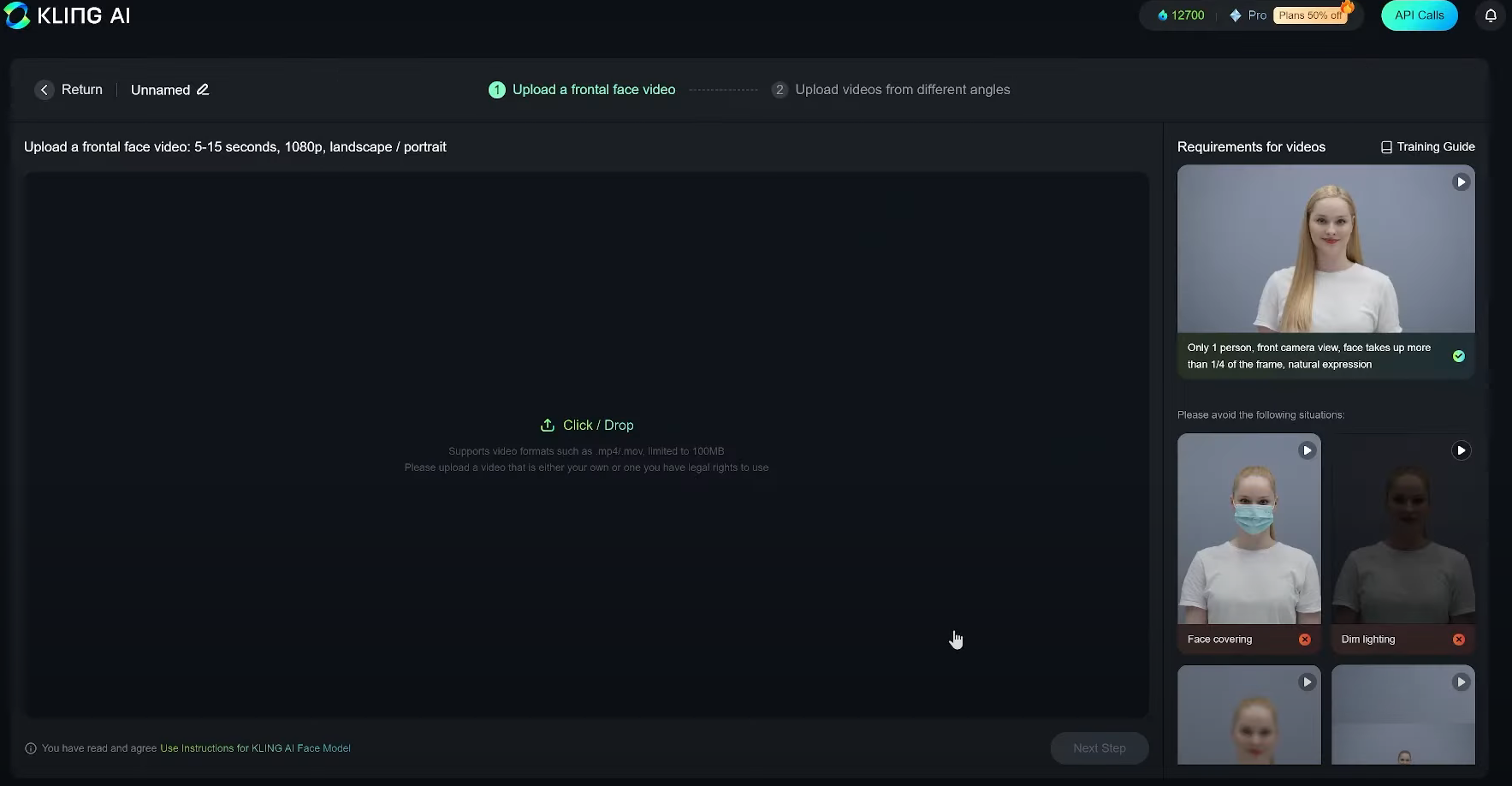
Step 2. Train the AI
You’ll have to record videos in various positions and from various angles, following the on-screen guides and recommendations. It takes a couple of hours for the AI to learn what you look like. To build a model, you require to train the AI.To do that, you’re going to have to upload a series of videos of yourself (or the person you want to build the model of, as long as you have their consent to do so).
Step 3. Make a Video
Once you’ve made your custom model, you can click on AI Videos and then Text to Video. Then, type in a prompt and produce sure you select your custom model as the Face Reference. You can configure the other settings, i.e. length, aspect ratio, camera movement, accordingly and set a negative prompt if desired.
Step 4. Generate
Lastly, click the Generate button to produce your video. You can then watch it in your browser window, save it to your device, or share it around, as you like.
Best Practices for Using the Kling AI Face Model Feature
Face Model is an amazing feature that unlocks tons of new opportunities in AI video generation. But, if you want to maximize your value when working with this technology, there are some best practices to keep in mind and a few crucial tips to ensure your model is the top accurate it can be:
- When recording the videos for Face Model training, create sure you stand in front of a blank background without any distractions or obtrusive elements that might cause problems.
- create sure the videos only have you (or your subject) in them, not anyone else.
- try to record your videos in at least 1080p quality.
- Follow all of the on-screen prompts and apply the provided action demonstrations when training the AI so that you get the best end results.
- You’ll require to provide around 10-30 videos, but aim for at least 20 to maximize the efficiency of the training process.
Give Kling AI a Try with Van Gogh Studio
If you’re eager to give Kling AI's video generator a try for yourself, one of the best ways to do so is via Van Gogh Studio.

Van Gogh Studio is an all-in-one AI video generator platform that provides you with access to multiple AI video models. You’ll benefit from Kling AI’s impressive video production features, along with the technology of various other AI video models, including Runway AI, Pika AI, Hailuo AI, Vidu AI, Luma AI, and more.
You also get access to Van Gogh Studio’s own video generation model, and all of its various fun AI video effects and templates and other awesome AI features. It’s the perfect package for those who are serious roughly AI videos.
Watch this tutorial to learn how to generate AI kissing and hug effect videos using Van Gogh Studio:
Face Model: The Next Evolution of AI Video
Face Model is set to redefine the entire AI video industry, taking AI video creation to brand new levels. It’s a tool that a lot of users have been asking for and dreaming of, and now it’s here, ready for you to use.
FAQs
What kinds of videos can you make with Face Model?
The sky’s the limit! Once you build your Face Model, you can leverage it to build almost any kind of text to video creation. That includes fantasy and magical-style videos, sci-fi videos, adventure videos, and greater lifelike, grounded videos, too.
Can I make a Face Model of anyone?
Yes, you can, but you want to have a person’s consent before uploading videos of them and making an AI video featuring their faces..
Is Kling AI Face Model free to use?
No, since this is such an advanced tool, it’s not currently available as a free option. You have to sign up for either the Pro or Premier plan of Kling AI to leverage Face Model.
What’s the purpose of Face Model?
The main purpose of this AI video feature is to support you produce a custom model of yourself, which you can then insert into future AI videos. You can train the AI to produce a custom model that looks like you, then add it to exciting video content for personal entertainment or commercial apply.
Create AI videos free
Try Van Gogh Studio free — text-to-video, image-to-video, and 300+ models in one place. Free credits on signup, no credit card required.
Try Free Video Generator


