

User-generated-style ads convert because they feel authentic—not like a polished TV spot. Hiring creators for every creative test is expensive and slow. Van Gogh Studio’s UGC Ad Video tool turns a product image plus a short scene prompt into a testimonial, unboxing, or before/after style clip you can ship to ads managers the same day.
This guide covers who the tool is for, the exact Van Gogh Studio steps, prompt patterns that read as “real creator,” and how to expand winning UGC into longer stories.
Who It’s For
- E-commerce brands testing many creatives without talent fees
- Affiliates producing review-style clips for several SKUs
- Dropshippers validating products with social-proof style ads
- Social managers who need authentic-feeling posts on a budget
- Performance marketers who need weekly creative refresh without a shoot day
How to Create UGC Ads on Van Gogh Studio
Step 1: Open UGC Ad Video and Upload Your Product Image
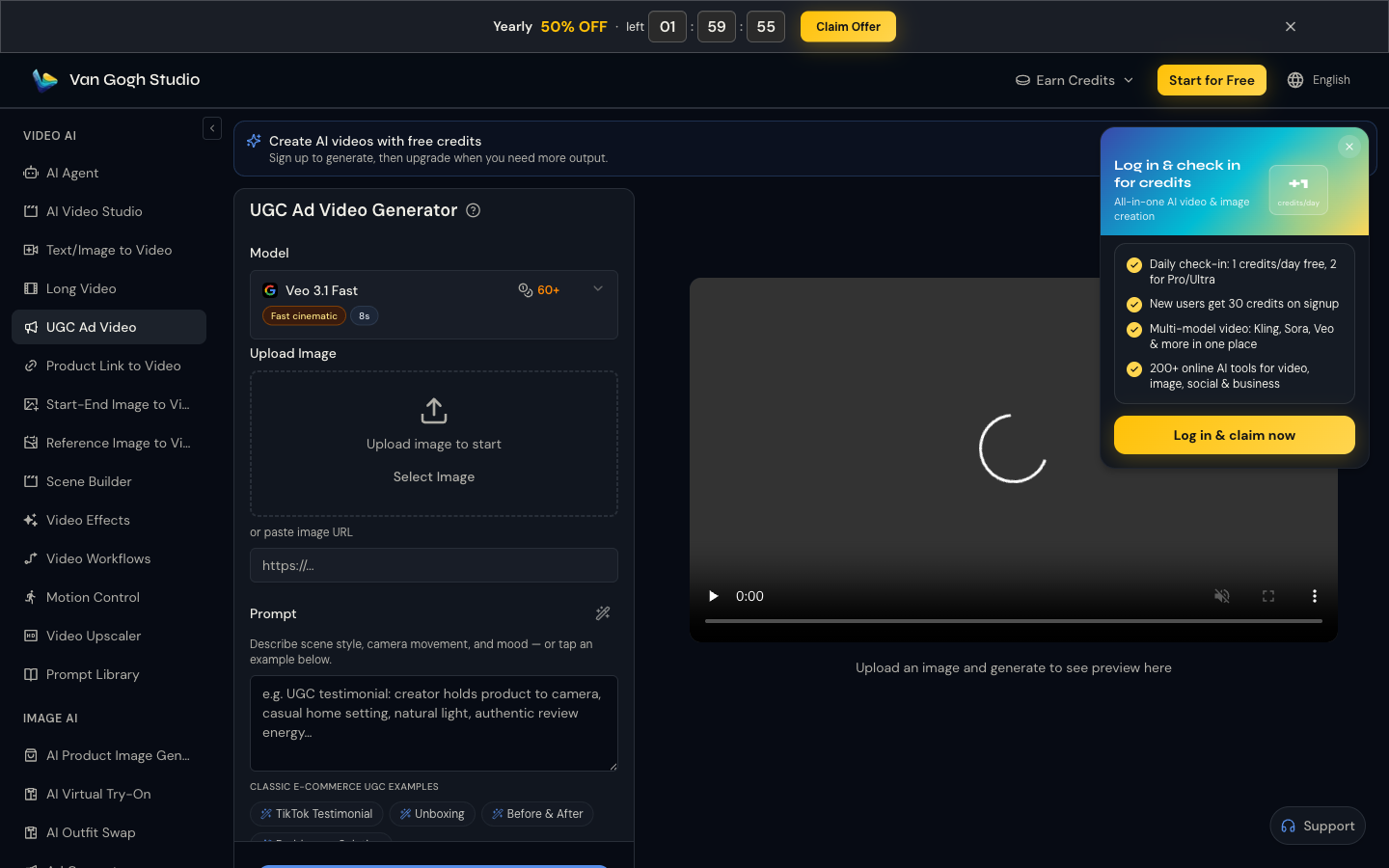
Go to UGC Ad Video (sidebar VIDEO AI → UGC Ad Video). Under Upload image to start, drop a product photo or paste an image URL. A clear packshot or in-hand product shot works best.
Step 2: Choose Model and Write the Scene Prompt
Pick a model (for example a fast cinematic option when you need volume). In the prompt box, describe the UGC scene—presenter energy, setting, and camera.
Example: UGC testimonial: creator holds product to camera, casual home setting, natural light, authentic review energy, slight handheld feel.
Use quick tags such as TikTok Testimonial, Unboxing, or Before & After when they match your angle.
Step 3: Set Output Preferences and Generate
Confirm aspect ratio for the platform (usually 9:16 for TikTok/Reels), preview the prompt, then generate. Review the right-hand player and download winners.
| UGC format | Best prompt cues | Typical use |
|---|---|---|
| Talking-head testimonial | “to camera,” casual room, honest tone | Meta/TikTok prospecting |
| Unboxing | tabletop, packing reveal, excitement | Launch and retargeting |
| Before & After | split narrative, problem → product | Skincare, cleaning, fitness |
| Feature demo | hands-on close-ups, benefit callouts | PDP + paid social |
Step 4: Deploy and Iterate Variants
Launch the clip in your ads manager or organic feed. Change one variable at a time—hook line, setting, or product angle—so you learn what converts.
Prompt and Input Tips
- Show the product clearly. Blurry packshots kill trust; use well-lit product photos.
- Write like a creator, not a brand deck. Short sentences, spoken cadence, one benefit per clip.
- Name the problem in the first line. “I was tired of X…” outperforms feature lists.
- Keep claims honest. AI makes the video; you still own compliance and substantiation.
- Batch 5–10 variants. UGC wins on volume of tests, not one perfect hero.
Common Mistakes
- Over-polished prompts (“luxury commercial lighting, perfect makeup”) that kill UGC authenticity
- Crowding the prompt with five benefits—pick one
- Using lifestyle photos where the product is tiny
- Skipping platform ratio until after generation
Related Tools
- Need ads from a product page URL instead of a still? Try product-link workflows alongside UGC Ad Video
- Need a longer story cut? Try Long Video
- Need a talking presenter with speech? Try AI Avatar
- Need a guided end-to-end workflow? Try AI Agent
- Need custom cinematic B-roll around the product? Try Text/Image to Video
Summary
Open UGC Ad Video, upload your product image, describe the creator-style scene, and generate. That is the Van Gogh Studio path to high-converting UGC ads without hiring a creator for every test. Start free at Van Gogh Studio.
FAQs
Can AI UGC replace real creators entirely?
It can replace a large share of creative testing volume. Many teams still film top winners with real creators after AI finds the winning angle.
What product images work best?
Clear packshots or in-hand shots with readable labels. Avoid cluttered lifestyle crops where the SKU is hard to see.
Which platforms should I target first?
Start with 9:16 for TikTok and Instagram Reels—the formats where UGC-style ads perform most naturally—then adapt winners to 1:1 or 16:9 if needed.
How is UGC Ad Video different from Text/Image to Video?
UGC Ad Video is built around product-led, creator-style ad scenes. Text/Image to Video is better for freeform cinematic shots and B-roll.
Create AI videos free
Try Van Gogh Studio free — text-to-video, image-to-video, and 300+ models in one place. Free credits on signup, no credit card required.
Try Free Video Generator


