

I tested Higgsfield AI to see whether its cinematic camera effects and image-to-video workflow really deliver director-style motion — or mainly look strong in demos.
In this Higgsfield AI review, I’ll share what it does well, where character motion and prompt fidelity fall short, who it fits best, and why I would choose Van Gogh Studio when I need broader model choice and a clearer path to publish-ready video.
Quick Verdict
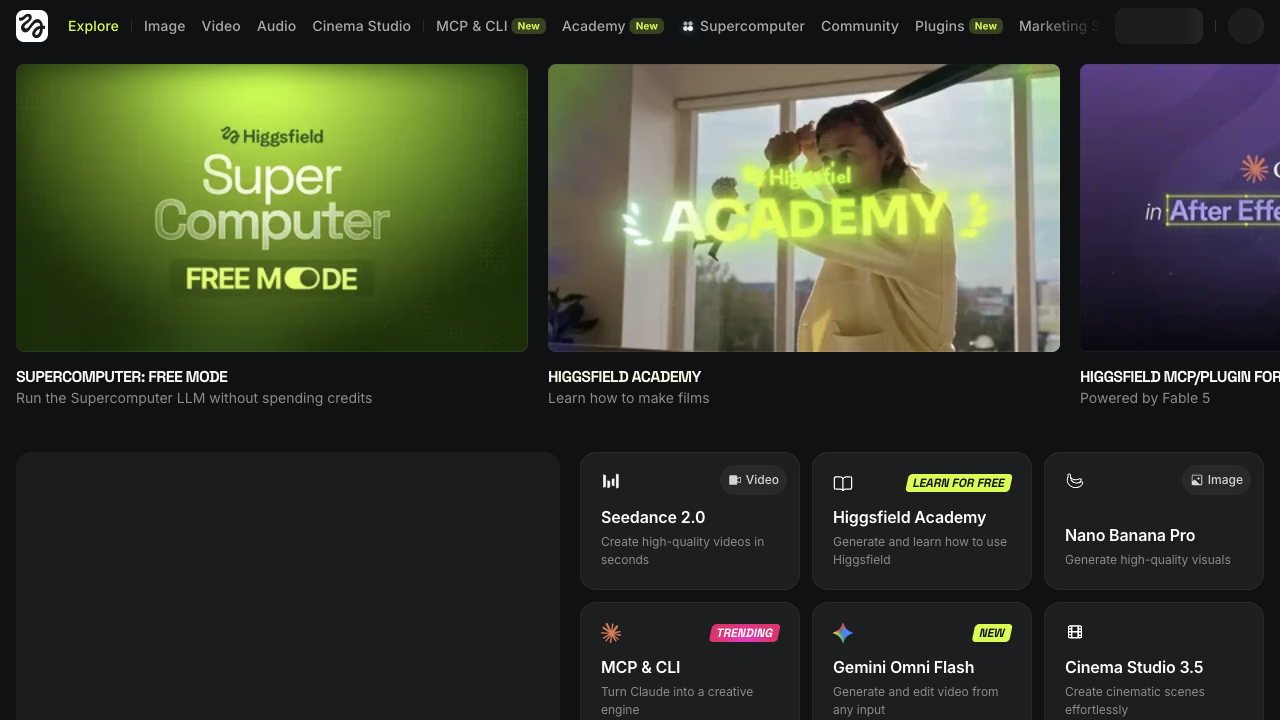
Higgsfield AI is a strong pick if your main goal is cinematic camera-driven clips: crash zooms, orbits, FPV-style moves, stylized shots, and image-to-video motion with a film-language feel. Soul image generation and camera presets make it appealing for music-video looks, fashion concepts, and commercial mood pieces.
It is a weaker choice when you need best-in-class character realism, deep editing, multi-scene campaign assembly, or consistent product storytelling. Higgsfield feels more like a camera-effects and cinematic generation tool than a full AI video studio. For a broader production path, I prefer Van Gogh Studio.
| Review Point | My Take |
|---|---|
| Best for | Cinematic camera effects, stylized image-to-video, fashion and music-video looks |
| Not best for | Reliable character performance, deep editing, or full campaign production |
| Strongest feature | Camera motion presets and cinematic shot language |
| Biggest limitation | Character motion and prompt adherence can lag stronger video models |
| Learning curve | Medium — interface density and shot choices take practice |
| My verdict | Great for camera-driven style; limited as a complete video platform |
What Is Higgsfield AI?
Higgsfield AI is a generative platform focused on high-aesthetic images and cinematic video motion. The workflow often moves from idea → image (including Soul) → image-to-video with camera effects, lens-style shots, and optional talking or speak-style clips.
Its clearest identity is camera language. Instead of only asking for “a person walking,” Higgsfield leans into director-style moves — orbits, crash zooms, FPV drone energy, push-ins — that make short clips feel more intentional.
That positioning matters. Higgsfield is less of a business-presenter tool and more of a visual / cinematic playground. It can look stunning when the shot is the point. It is less convincing when natural character performance, product accuracy, or end-to-end publishing is the point.
Key Features I Reviewed
Higgsfield’s feature set is organized around aesthetic image generation, camera-driven video motion, and character-centric clips.
Soul AI Image Generation
Soul is Higgsfield’s standout image model for realistic, high-aesthetic stills. Presets for looks such as street photography, Y2K, and nostalgic styles help users get to a visual direction without writing every camera setting by hand.
In my tests, character stills looked less plastic than many generic image tools. Skin texture, lighting, and environment detail can feel photograph-like. That makes Soul useful as a starting point for fashion concepts, character boards, and later image-to-video animation.
The limit is category range. Abstract or highly conceptual image work is less of a strength than photorealistic and style-preset looks.
Cinematic Camera Effects and Image-to-Video
Camera effects are Higgsfield’s main video differentiator. Presets such as crash zooms, 360 orbits, FPV drone, and push-in style moves give creators a shortcut to cinematic energy.
This is where Higgsfield feels most itself. Music-video directors, fashion editors, and commercial concept creators who care about shot composition will understand the value immediately.
The honest limit is that camera language is not the same as full video quality. In side-by-side tests with stronger general video models, character faces, expressions, and action fidelity on Higgsfield can look stiffer or glossier. A beautiful camera move around a weak performance still reads as an unfinished clip.
Speak / Talking Character Clips
Higgsfield also offers speak-style workflows for talking character videos, with motion templates such as walk-and-talk, selfie, or car-talking setups, plus script or uploaded audio options.
This expands the platform beyond silent cinematic B-roll. It is useful for stylized talking clips. I would still review lip sync, expression naturalness, and overall polish before using the result in brand work — especially compared with dedicated AI avatar tools.
Style Presets and Creative Direction Shortcuts
Image styles, camera presets, and motion templates reduce blank-page friction. For creators who think in shots rather than scripts, that matters.
The tradeoff is interface density. First-time users can feel lost among models, presets, and motion options. Guidance helps; it does not fully replace a simpler production path when the job is a finished ad, not a stylish experiment.
Pros and Cons
What I Liked
- Strong cinematic camera presets for orbits, zooms, and FPV-style motion
- Soul image generation can look highly realistic and aesthetic
- Useful image-to-video path from still concept to moving shot
- Speak / talking character modes expand beyond silent clips
- Clear appeal for music-video, fashion, and commercial mood work
What Held It Back
- Character motion and expressions can lag stronger video models
- Prompt adherence is uneven on detailed action requests
- Limited deep editing after generation
- Interface can feel complex for first-time users
- Not built as a full campaign or multi-scene publishing system
Create Full Videos with Van Gogh Studio Free
Where Higgsfield AI Falls Short
Higgsfield’s limits show up when camera style is not enough to carry the result.
Camera Effects ≠ Best Character Performance
A stylish orbit does not fix stiff faces, weak sipping/action fidelity, or glossy skin that reads as artificial. In my comparisons, general-purpose models such as Kling often produced more believable character behavior on the same brief.
Prompt Adherence Can Drift
Detailed action requests — exact gestures, product interactions, emotional beats — may only partially land. That makes Higgsfield riskier for briefs where the specific action is the sell.
Editing and Finishing Stay Thin
Higgsfield helps you generate a cinematic moment. Captions, multi-scene structure, product inserts, and publish packaging usually need another tool. Camera presets are not a substitute for post-production.
Narrower Than a Full Creative Studio
Marketing teams that need hooks, variations, UGC formats, and channel-ready ads will outgrow a camera-effects workflow. Performance creatives and UGC video ads need more than one stylish shot.
Real Use Cases
| Use Case | My Take |
|---|---|
| Music-video style clips | Strong fit — camera motion is the product |
| Fashion / aesthetic concept videos | Strong fit when look and shot language matter most |
| Commercial mood films | Good fit for atmospheric short concepts |
| Talking character social clips | Mixed fit — usable, but review naturalness carefully |
| Product demo accuracy | Limited fit — action fidelity can miss the mark |
| Multi-scene brand campaigns | Weak fit — not a full campaign assembly system |
| Everyday business explainers | Not the strongest category; presenter tools fit better |
Higgsfield AI vs Van Gogh Studio
| Dimension | Higgsfield AI | Van Gogh Studio |
|---|---|---|
| Main workflow | Cinematic camera effects and aesthetic image-to-video | Full AI video generation, editing, and publish-ready workflows |
| Camera / cinematic style | Core strength with motion presets | Available via multi-model text to video and image to video |
| Image generation | Strong Soul aesthetic stills | Broader AI image generator plus video finishing |
| Creative range | Narrower camera / character-centric focus | Broader coverage across ads, explainers, social, and story videos |
| Marketing output | Better for stylish concepts than campaign sets | Stronger with UGC ad video and campaign-ready workflows |
| Editing flexibility | Limited after generation | Stronger follow-up refinement with the AI video editor |
| Best fit | Creators chasing cinematic shot language | Creators and marketers who need finished AI videos, not only stylish clips |
Why Van Gogh Studio Is a Better Higgsfield AI Alternative

Higgsfield is useful for camera-driven style. Van Gogh Studio is stronger when I want cinematic generation plus model choice, editing, avatars, and a clearer path to publish-ready output.
Broader AI Video Generation, Not Only Camera Presets

Van Gogh Studio gives me more starting points: text to video for concepting, image to video for stills, and multi-model access when I want different motion styles. Models such as Veo 3.1, Kling 3.0, and Seedance 2.5 matter when one camera look is not enough.
That is the clearest gap versus Higgsfield. Higgsfield can sell the shot; Van Gogh Studio can test several visual directions for the same brief.
Finish Stylish Clips Into Real Videos

Van Gogh Studio Agent covers the gap a cinematic clip leaves open: structure, pacing, captions, music, and publish-ready assembly. That matters when the job is a finished explainer, ad, or story — not only a stylish orbit around a subject.
Create Videos with Van Gogh Studio Agent
Avatar and Marketing Paths When Style Alone Is Not Enough

With AI avatar, I can create presenter clips when a talking face is the right format. With UGC ad video and link to video, I can move from assets and URLs into campaign-oriented output that camera presets alone do not assemble.
Prompt-based cleanup in the AI video editor also helps when a generation is almost right but still needs visual fixes before publish.
Final Verdict: Is Higgsfield AI Worth Using?
Higgsfield AI is worth using if you care about cinematic camera language — orbits, crash zooms, FPV energy, and aesthetic image-to-video looks for fashion, music, or commercial mood work. Soul stills and shot presets are genuine strengths.
Character performance and production depth are the main issues. When natural action, reliable prompt fidelity, multi-scene structure, or campaign finishing matter more than the camera move, stronger general video models and a fuller studio workflow are the better bet.
Use Higgsfield when the shot is the job. For a broader AI video workflow, I would choose Van Gogh Studio. It combines multi-model generation, editing, avatars, Agent-led publish-ready workflows, and campaign tools — so stylish clips can become finished videos instead of stopping at a cinematic demo.
Higgsfield AI Review FAQs
What is Higgsfield AI used for?
Higgsfield AI is used for aesthetic image generation and cinematic AI video — especially image-to-video clips with camera motion presets, stylized shots, and character-centric concepts for fashion, music, and commercial mood work.
Is Higgsfield AI better than Kling or Runway?
Not overall. Higgsfield can feel stronger for camera-effect presets and aesthetic stills. For believable character motion and general video fidelity, models such as Kling often look more natural on the same brief.
What is the biggest drawback of Higgsfield AI?
For me, the biggest drawback is that stylish camera motion can outrun character performance and finishing tools. A great orbit around a stiff or glossy subject still needs another workflow before it feels publish-ready.
What is the best Higgsfield AI alternative?
If you want cinematic generation plus a complete AI video workflow, Van Gogh Studio is the better alternative. It covers text to video, image to video, multi-model access, AI avatar, editing, UGC ads, and Agent-led videos in one workspace.
Create AI videos free
Try Van Gogh Studio free — text-to-video, image-to-video, and 300+ models in one place. Free credits on signup, no credit card required.
Try Free Video Generator


