

I tried Funy AI to see whether its effect-first approach — hug, kiss, dance, fight, and old-photo style clips — is useful beyond quick entertainment demos.
In this Funy AI review, I’ll share what it does well, where the short-clip workflow starts to feel thin, who it fits best, and why I would choose Van Gogh Studio when I need a broader path from idea to publish-ready video.
Quick Verdict
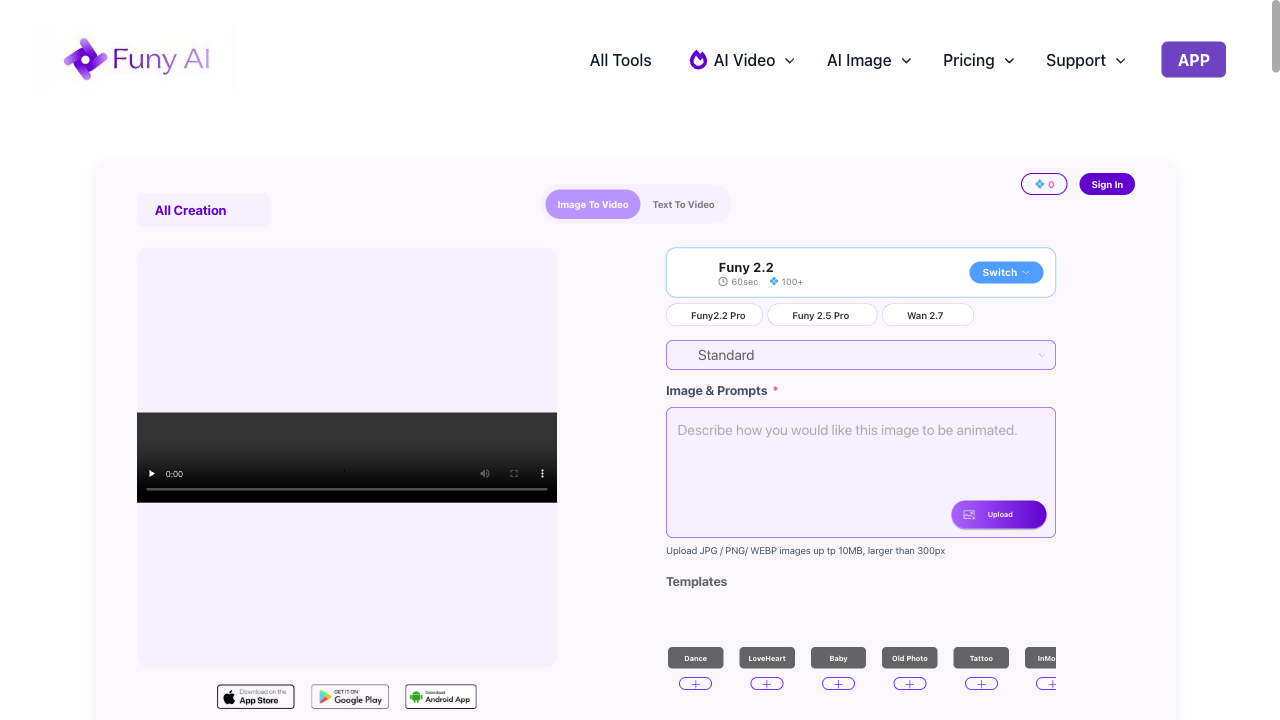
Funy AI is a strong pick if your main goal is short, effect-driven entertainment clips for casual social posts. Text-to-video, image-to-video, and recognizable effect formats make it easy to generate a quick moving clip without learning a full editor.
It is a weaker choice when you need ads, product motion, multi-scene stories, branded campaigns, or deeper control over pacing and visual storytelling. For a fuller production workflow, I prefer Van Gogh Studio.
| Review Point | My Take |
|---|---|
| Best for | Short AI effect videos and casual social entertainment clips |
| Not best for | Ads, product videos, multi-scene stories, or branded campaigns |
| Strongest feature | Recognizable effect formats like hug, kiss, dance, fight, and old photo animation |
| Biggest limitation | Clip-first workflow with little depth after generation |
| Learning curve | Easy for beginners and casual creators |
| My verdict | Fun for quick effects; limited as a full video production tool |
What Is Funy AI?
Funy AI is an AI video generator focused on short, simple-to-create clips. Its main video features include text to video, image to video, AI kissing videos, AI hug videos, AI dance videos, AI fight videos, and old photo animation.
I would place it in the casual AI video category. It is built around speedy clip creation and recognizable effect formats rather than complex video production.
Compared with open-ended AI video studios, Funy feels more like an effects playground. It is less about building cinematic scenes or campaign creatives and more about turning a prompt or photo into a short, shareable moment.
Key Features I Reviewed
Funy’s feature set is organized around quick generation and effect-style formats.
Text to Video
Funy’s text to video feature turns a written idea into a short generated clip. The workflow is direct and approachable for users who want to test a simple visual concept without filming first.
This works best for obvious scene ideas — a dreamy travel moment, a playful character action, or a light story concept. I found it useful for quick visual exploration, not for structured narrative or ad messaging.
Image to Video
Image to video is useful when you already have a still and want to add motion. A clear starting image gives the tool more visual direction than text alone.
I used it to turn a portrait, character visual, and an old family photo into short moving clips. It can fit personal memory videos, simple creator inserts, or light social moments. For casual content, the workflow is easy to understand.
AI Effect Videos
Effect videos are Funy’s clearest feature area. The platform includes formats such as AI kissing videos, AI hug videos, AI dance videos, AI fight videos, and old photo animation.
These effects fit emotional, funny, nostalgic, or exaggerated short clips. This is where Funy feels most focused: recognizable formats instead of making users build every idea from scratch.
Short Video Creation Workflow
Funy’s workflow is built around quick generation. Users select a feature, add the required input, and generate a short clip without managing a complicated timeline.
That makes it suitable for simple creator ideas, personal clips, and quick entertainment videos. For structured visual storytelling — product promos, UGC ad video, or multi-scene stories — users generally need more planning around pacing, scene order, and final polish.
Pros and Cons
What I Liked
- Simple short-video workflow that is easy for beginners
- Clear effect-style tools for hug, kiss, dance, fight, and old photo clips
- Supports both text-to-video and image-to-video
- Fits casual social and entertainment use cases
- Fast path from idea or photo to a short moving clip
What Held It Back
- Limited depth for finished video production
- Less suitable for structured campaign videos and product ads
- Follow-up editing options are limited after generation
- Output consistency needs review for serious brand use
- Multi-scene storytelling and publish-ready assembly are weak
Create Full Videos with Van Gogh Studio Free
Where Funy AI Falls Short
Funy’s limits show up when a short generated clip needs to become a finished video with structure, pacing, captions, music, and a clear beginning and ending.
Clip-First, Not Campaign-Ready
Funy can feel restrictive when the project needs more than one effect clip. Many campaigns need stronger scene design, richer motion, visual storytelling, or flexible creative direction.
This becomes obvious when creating product ads, cinematic clips, social campaigns, or story-driven content. The workflow does not give enough room to build videos that look visually distinct beyond a quick effect.
Little Control After Generation
Funy is not the most flexible option when you want to reshape a video scene by scene. The guided path helps beginners, but it also limits control over camera movement, scene transitions, product placement, and visual style.
For projects that depend on mood, motion, composition, or detailed creative direction, the workflow can feel too constrained.
Marketing Outputs Stay Thin
Funy may not be strong enough for marketing videos that need differentiation. Performance ads, ecommerce creatives, UGC video ads, and social campaigns usually depend on fast hooks, product close-ups, scene changes, and platform-native energy.
Funy’s outputs can feel too effect-driven and disposable for those needs. When the video needs to sell through visuals rather than a novelty motion, the result may not feel competitive.
Real Use Cases
| Use Case | My Take |
|---|---|
| Social entertainment clips | Strong fit — funny, emotional, or exaggerated short effects |
| Personal memory videos | Good fit — old photo animation and image-based motion work well |
| Creator casual inserts | Useful for quick visual inserts and light motion effects |
| Product concept rough cuts | Limited fit — can test a simple idea, weaker for polished product video |
| Ad idea exploration | Mixed fit — early motion tests only; full ads need structure and hooks |
| Brand campaigns | Weak fit — not built for consistent, publish-ready campaign creatives |
| Multi-scene stories | Not the right tool; use a fuller AI video studio |
Funy AI vs Van Gogh Studio
| Dimension | Funy AI | Van Gogh Studio |
|---|---|---|
| Main workflow | Short AI clips and effect videos | Full AI video generation, editing, and publish-ready workflows |
| Effect / entertainment clips | Core strength with hug, kiss, dance, fight, and old photo formats | Available via broader text to video and creative tools |
| Text / image to video | Simple generation for short clips | Stronger text to video and image to video paths |
| Creative range | Narrower effect / casual focus | Broader coverage across ads, explainers, social, and story videos |
| Marketing output | Better for novelty clips than campaign creatives | Stronger with UGC ad video and campaign-ready workflows |
| Editing flexibility | Limited after generation | Stronger follow-up refinement with the AI video editor |
| Best fit | Creators who want quick entertainment effects | Creators and marketers who need finished AI videos, not only effect clips |
Why Van Gogh Studio Is a Better Funy AI Alternative

Funy is useful for short effect clips. Van Gogh Studio is stronger when I want an AI creative suite that can support many video styles, editing, talking avatars, and audio in one place.
Broader AI Video Generation, Not Only Effects

Van Gogh Studio gives me more starting points: text to video for concepting, image to video for product stills, and multi-model access when I want different motion styles. Models such as Veo 3.1, Kling 3.0, and Seedance 2.5 matter when one look is not enough.
That is the clearest gap versus Funy. Funy can animate a novelty moment; Van Gogh Studio can explore different visual directions for the same brief.
Avatar Videos When a Presenter Helps

With Van Gogh Studio’s AI avatar video generator, I can turn one photo into a lip-synced talking avatar with natural expressions and gestures — without filming or long avatar training.
Funy is not an avatar-first product. When a project needs a presenter clip inside a larger video — product explainers, UGC-style pitches, training intros — having avatars next to text-to-video and editing is more practical than stopping at an effect clip.
Create Avatar Videos with Van Gogh Studio Free
Post-Ready Videos With Van Gogh Studio Agent
Van Gogh Studio Agent gives a stronger end-to-end production advantage. Instead of only generating separate effect clips, it is designed to create structured, production-ready videos with less manual assembly.
I can start from an idea, text, image, or URL, and the Agent can help handle structure, pacing, visuals, and sound. That makes it more suitable when I want a finished result instead of a novelty draft that still needs another tool.
It also supports more content directions — viral video cloning, UGC ads, story videos, anime videos, music videos, and news-style videos — so the workflow stays adaptable for real publishing tasks.
Create Videos with Van Gogh Studio Agent
Stronger Marketing and Commerce Workflows
For ads, launches, and product promos, I need hooks, variations, pacing, and channel-ready formats. Van Gogh Studio’s marketing and product-video workflows are built for that campaign output, not just one effect clip. URL-to-video and photo-to-video paths also help teams move from assets to ads faster via link to video and UGC ad video.
Final Verdict: Is Funy AI Worth Using?
Funy AI is fast, approachable, and genuinely useful for users who want short effect videos and casual entertainment clips without a heavy creative stack.
Production depth is the main issue. Funy is not a strong choice for cinematic videos, product ads, ecommerce visuals, UGC-style campaigns, or highly creative social video beyond novelty effects.
Use Funy when a quick effect is the job. For a broader AI video workflow, I would choose Van Gogh Studio. It combines multi-model video generation, editing, AI avatars, Agent-led publish-ready workflows, and campaign tools in one place — so you can entertain, sell, and create without switching platforms when the brief turns into real video.
Funy AI Review FAQs
What is Funy AI used for?
Funy AI is used for generating short AI videos, including text-to-video clips, image-to-video clips, kissing videos, hug videos, dance videos, fight videos, and old photo animations.
Is Funy AI good for professional video production?
Not as a full production tool. Funy can help with rough visual ideas and casual entertainment clips, but professional videos typically need stronger control over pacing, editing, captions, scene structure, and final output quality.
What is the biggest drawback of Funy AI?
For me, the biggest drawback is limited workflow depth beyond short effect clips. If you need campaign variation, product motion, or multi-scene stories, you will likely outgrow it.
What is the best Funy AI alternative?
If you want more than quick effect drafts, Van Gogh Studio is the better alternative. It covers text to video, image to video, AI avatar, editing, UGC ads, and longer story videos in one workspace.
Create AI videos free
Try Van Gogh Studio free — text-to-video, image-to-video, and 300+ models in one place. Free credits on signup, no credit card required.
Try Free Video Generator


