

I tested Adobe Firefly to see whether Adobe’s generative stack — text-to-image, Generative Fill, and Firefly video — is strong enough for real creative work, or mainly convenient if you already live in Creative Cloud.
In this Adobe Firefly review, I’ll share what it does well, where image quality and video depth still fall short, who it fits best, and why I would choose Van Gogh Studio when I need a broader path from idea to publish-ready video.
Quick Verdict
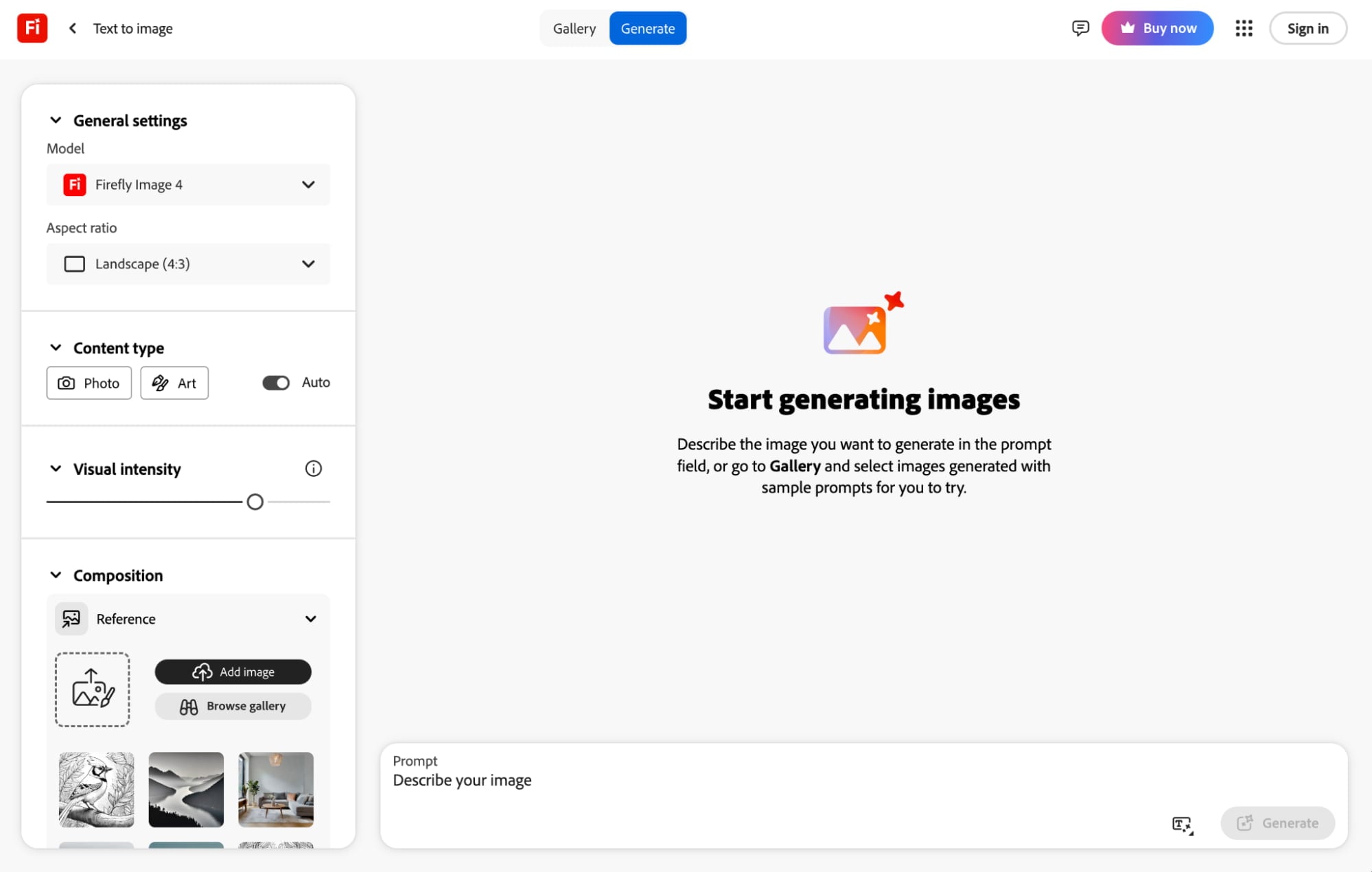
Adobe Firefly is a strong generative option if your main goal is commercially safer AI images inside the Adobe ecosystem — Photoshop Generative Fill, Illustrator/Lightroom workflows, reference-guided composition, and style controls that feel familiar to design teams.
It is a weaker choice when you need best-in-class prompt fidelity, cinematic multi-model video, campaign-ready UGC ads, or a full AI video production path. Firefly video is usable for short motion tests, but it is not the reason I would pick Firefly over a dedicated AI video generator. For that broader path, I prefer Van Gogh Studio.
| Review Point | My Take |
|---|---|
| Best for | Adobe users who need generative images, Generative Fill, and commercially safer Stock-trained assets |
| Not best for | Best-in-class video generation, complex prompt fidelity, or campaign-ready multi-scene ads |
| Strongest feature | Creative Cloud integration plus Generative Fill / reference-guided image workflows |
| Biggest limitation | Image quality can glitch; video tools feel basic versus dedicated AI video platforms |
| Learning curve | Easy if you already know Adobe apps; moderate for Firefly-only beginners |
| My verdict | Excellent Adobe ecosystem companion; limited as a standalone AI video studio |
What Is Adobe Firefly?
Adobe Firefly is Adobe’s generative AI family for images, effects, and short video, built to sit inside Creative Cloud rather than replace it.
On the image side, Firefly covers text-to-image with Firefly models (including newer Ultra-class options), plus partner models such as Imagen and GPT Image in some Firefly surfaces. You can guide composition and style with references, adjust color, tone, lighting, and camera feel, and continue editing in Photoshop with Generative Fill.
On the video side, Firefly can turn prompts into short clips with camera motion controls. That is useful for simple atmospheric motion, but it is still early compared with open-ended video models like Kling 3.0 or Veo 3.1.
The strategic advantage is trust and workflow: Firefly is trained with a strong emphasis on Adobe Stock and openly licensed content for commercial use cases. The strategic limit is quality ceiling. Integration does not automatically beat specialized generators on prompt adherence or cinematic motion.
You can also try Firefly-class generation via Adobe Firefly when you want Adobe’s look inside a multi-model workspace.
Key Features I Reviewed
Firefly’s feature set splits into two lanes: mature generative imaging inside Adobe, and a thinner video generator.
Text to Image and Style Controls
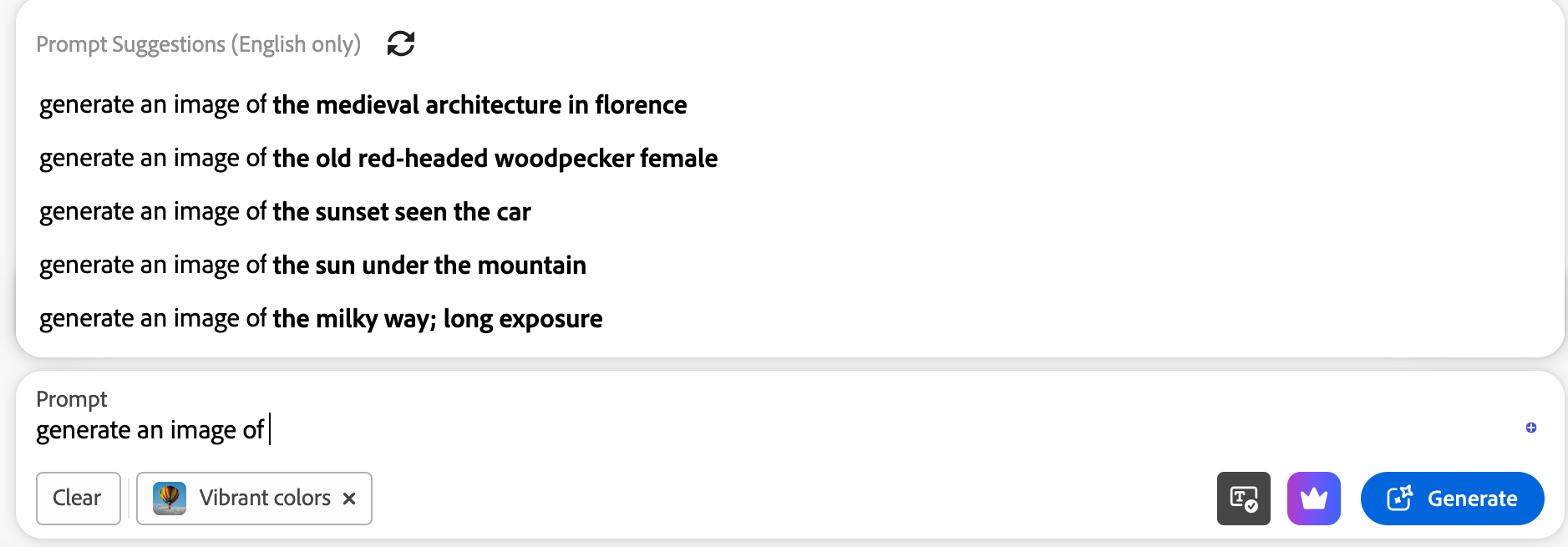
Firefly’s text-to-image path is the easiest entry point. You write a prompt, pick a model or style direction, and get stills across photo and art looks — anime, futuristic, pop art, synthwave, and more.
Prompt suggestions help beginners. Color, tone, lighting, and camera-angle controls help when you know the mood but not the exact wording. That is Firefly at its most practical: guided image ideation for designers who already think in visual settings.
Reference Images and Generative Fill
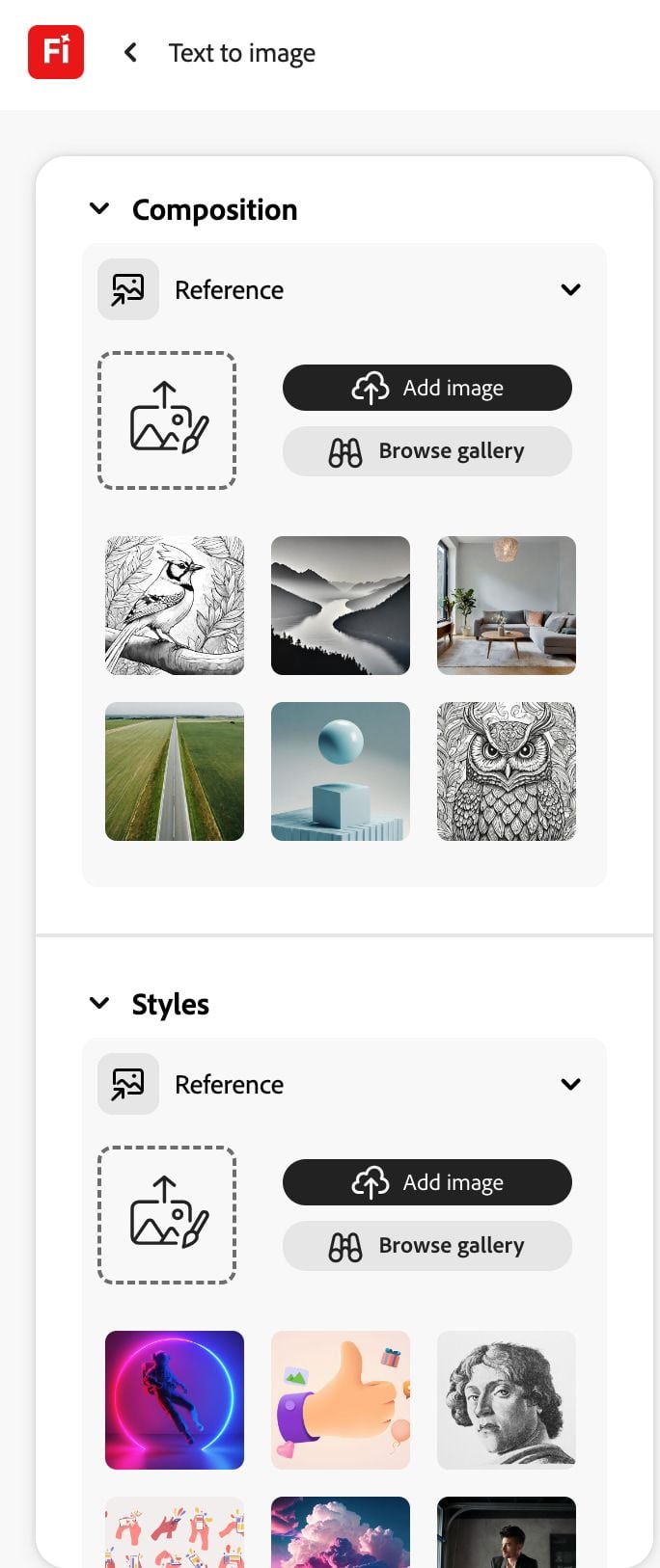
Reference photos for composition and style are one of Firefly’s clearest strengths. Instead of relying on prompt luck alone, you can steer structure and look with examples — then reuse generated images as references for tighter iterations.
Creative Cloud is the real multiplier. Generating a base image is only half the job; expanding, painting into, and finishing it with Generative Fill in Photoshop is where Firefly feels native rather than bolted on.
Partner Models Beside Firefly
Firefly surfaces sometimes let you switch beyond Adobe’s own image models to options such as Imagen or GPT Image. That flexibility helps when one model misses the brief.
It does not turn Firefly into a true multi-model video suite. Model switching helps stills more than finished campaign video.
Text to Video and Camera Motion
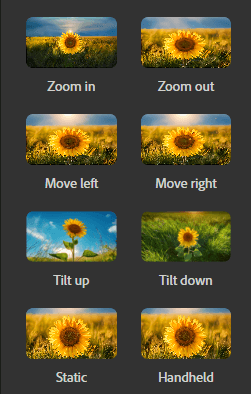
Firefly’s video generator can produce short clips from prompts and offers camera moves such as zoom, pan, and tilt. Landscapes, animals, and atmospheric motion often look cleaner than complex human action.
In my tests, simple ocean or creature motion could look striking, while human-centric scenes and dense multi-subject action were less reliable. Clips stay short, customization is thinner than dedicated video platforms, and you still need another workflow for captions, multi-scene structure, and campaign polish.
Pros and Cons
What I Liked
- Strong Creative Cloud integration for designers already in Photoshop, Illustrator, and Lightroom
- Commercially safer positioning via Adobe Stock / licensed-training emphasis
- Reference-guided composition and style controls improve iteration beyond bare prompts
- Generative Fill makes Firefly useful after generation, not only at the first render
- Partner image models expand still options inside the same Firefly surface
- Camera motion controls help short atmospheric video tests
What Held It Back
- Image quality can show glitches, prompt misses, or lazy multi-subject framing
- Negative-prompt / omit-element control felt weaker than specialized image tools
- Video generation is basic compared with dedicated AI video platforms
- Human-centric and complex action scenes need more retries
- Not a full publish-ready video studio for ads, UGC, or multi-scene stories
- Best value assumes you already pay for / live in Adobe’s ecosystem
Create Full Videos with Van Gogh Studio Free
Where Adobe Firefly Falls Short
Firefly’s limits show up when the job is open-ended generative quality — not Adobe workflow convenience.
Image Quality Is Uneven on Hard Prompts
In my still tests, Firefly could look excellent on clean landscapes and stylized character art, then stumble on crowded markets, multi-object fashion scenes, or complex cinematic briefs. Faces hidden from camera, warped props, and incomplete prompt adherence showed up enough that I would not treat first exports as final brand assets.
Video Is Not Firefly’s Center of Gravity
Firefly video is fine for short motion experiments. It is not competitive as a primary AI video generator when you need product ads, UGC hooks, anime sequences, or multi-scene storytelling. Camera controls help, but clip length, model depth, and finishing tools stay thin.
Ecosystem Lock-In Cuts Both Ways
If your team already uses Creative Cloud, Firefly is convenient. If you do not, paying Adobe rent for generative features that specialized tools may outperform is a harder sell — especially for video-first creators.
Marketing Videos Still Need Another Stack
Performance ads, ecommerce creatives, and UGC video ads need hooks, product close-ups, variations, captions, and channel formats. Firefly can contribute stills or short B-roll. It rarely finishes the campaign alone.
How I Reviewed Adobe Firefly
I reviewed Firefly as both an Adobe design companion and a generative video option — not only as a homepage demo.
Main areas I considered:
- Image quality — realism, style control, anomalies, and prompt adherence across hard scenes
- Workflow fit — whether Creative Cloud integration actually reduced design friction
- Video usefulness — whether short clips were usable beyond novelty motion
- Commercial practicality — licensing posture and production readiness for real briefs
- Creative control — references, settings, and post-generation editing depth
- Use-case coverage — concept art, product stills, social motion, ads, and finished video
Is Adobe Firefly Right for You?
Firefly is a strong fit if you already work in Adobe apps and need generative images, Generative Fill, and commercially safer Stock-trained assets for design, marketing comps, or concept exploration.
It is also useful if your team values ecosystem continuity more than chasing the absolute best open generative video model. Firefly’s advantage is not raw novelty — it is staying inside a familiar Creative Cloud path.
Firefly is less ideal if your main job is cinematic AI video, multi-model comparison, UGC ads, or publish-ready campaign production. In those cases, a broader generative studio is the better starting point.
In short: Firefly is right for Adobe-centric image workflows. It is less ideal as your only AI video platform.
Real Use Cases
| Use Case | My Take |
|---|---|
| Design comps and mood boards | Strong fit — fast ideation inside Adobe workflows |
| Photoshop Generative Fill edits | Strong fit — native continuation after generation |
| Brand-safe commercial stills | Good fit when Adobe’s licensing posture matters |
| Stylized concept art | Mixed fit — can look great, needs review for anomalies |
| Short atmospheric B-roll | Decent fit for simple motion tests |
| Product / ecommerce video ads | Limited fit — better as stills + another video tool |
| Full campaign or UGC production | Weak fit alone; needs a broader AI video stack |
Adobe Firefly vs Van Gogh Studio
| Dimension | Adobe Firefly | Van Gogh Studio |
|---|---|---|
| Main workflow | Generative images + light video inside Creative Cloud | Full AI video generation, editing, and publish-ready workflows |
| Image generation | Strong Adobe / partner model surface with Generative Fill | Broader AI image generator plus video-first finishing |
| Video generation | Basic short-clip Firefly video | Stronger text to video and image to video with multi-model access |
| Ecosystem | Best if you already pay for Adobe apps | Best if you want generative video without Adobe lock-in |
| Marketing output | Useful stills and short B-roll fragments | Stronger with UGC ad video and campaign workflows |
| Editing flexibility | Excellent inside Photoshop after stills | Stronger video refinement with the AI video editor |
| Best fit | Design teams living in Creative Cloud | Creators and marketers who need finished AI videos, not only Adobe comps |
Why Van Gogh Studio Is a Better Adobe Firefly Alternative

Firefly is useful as an Adobe generative companion. Van Gogh Studio is stronger when I want image-to-video, multi-model generation, editing, and publish-ready assembly in one place — without making Creative Cloud the center of the workflow.
Broader AI Video Generation, Not Only Adobe Clips

Van Gogh Studio gives me more starting points: text to video for concepting, image to video for product stills, and multi-model access when I want different motion styles. Models such as Veo 3.1, Kling 3.0, and Seedance 2.5 matter when one Firefly look is not enough.
That is the clearest gap. Firefly can generate a short motion test; Van Gogh Studio can explore multiple video directions for the same brief.
Avatar Videos When a Presenter Helps

With Van Gogh Studio’s AI avatar video generator, I can turn one photo into a lip-synced talking avatar — without filming. Firefly is not an avatar-first product. When a project needs a presenter inside a larger video, having avatars next to generative scenes is more practical.
Create Avatar Videos with Van Gogh Studio Free
Post-Ready Videos With Van Gogh Studio Agent

Van Gogh Studio Agent covers the gap Firefly leaves open: structure, pacing, captions, music, and a clearer path from idea to a shareable video. That is the difference between collecting comps and shipping something complete.
It also supports more content directions — viral video cloning, UGC ads, story videos, anime videos, music videos, and news-style videos — so the workflow stays adaptable for real publishing tasks.
Create Videos with Van Gogh Studio Agent
Stronger Marketing and Commerce Workflows
For ads, launches, and product promos, I need hooks, variations, pacing, and channel-ready formats. Van Gogh Studio’s marketing workflows — including UGC ad video and link to video — are built for that campaign output, not just generative stills or five-second motion.
Final Verdict: Is Adobe Firefly Worth Using?
Adobe Firefly is worth using if you already live in Creative Cloud and need generative images, Generative Fill, and commercially safer Adobe-aligned assets. For design teams, that ecosystem fit is genuinely useful.
Video depth and uneven hard-prompt image quality are the main issues. Firefly is not the strongest choice as a standalone cinematic video platform, UGC ad engine, or multi-model production suite.
Use Firefly for Adobe-centric image work. For a broader AI video workflow, I would choose Van Gogh Studio. It combines multi-model video generation, editing, AI avatars, Agent-led publish-ready workflows, and campaign tools in one place — so you can move from idea to finished video without making Photoshop the whole stack.
Adobe Firefly Review FAQs
Is Adobe Firefly good for commercial projects?
Yes for many still-image workflows, especially when Adobe’s Stock-trained / licensed-content posture matters to your team. Always check current Adobe terms for your use case. For finished video ads, you will often still need a stronger video workflow.
Does Adobe Firefly generate video?
Yes, but the video tools are more basic than dedicated AI video platforms. Firefly is useful for short atmospheric clips and camera-motion tests, not as a full campaign production system.
What is the biggest drawback of Adobe Firefly?
For me, the biggest drawbacks are uneven image quality on complex prompts and limited video depth. Creative Cloud integration is excellent; open-ended generative excellence is not guaranteed.
What is the best Adobe Firefly alternative?
If you want generative images plus a complete AI video workflow, Van Gogh Studio is the better alternative. It covers text to video, image to video, AI avatar, editing, UGC ads, and Agent-led publish-ready videos in one workspace.
Create AI videos free
Try Van Gogh Studio free — text-to-video, image-to-video, and 300+ models in one place. Free credits on signup, no credit card required.
Try Free Video Generator


