¿Quiere una experiencia sin anuncios? Actualice su plan.

Comparativas

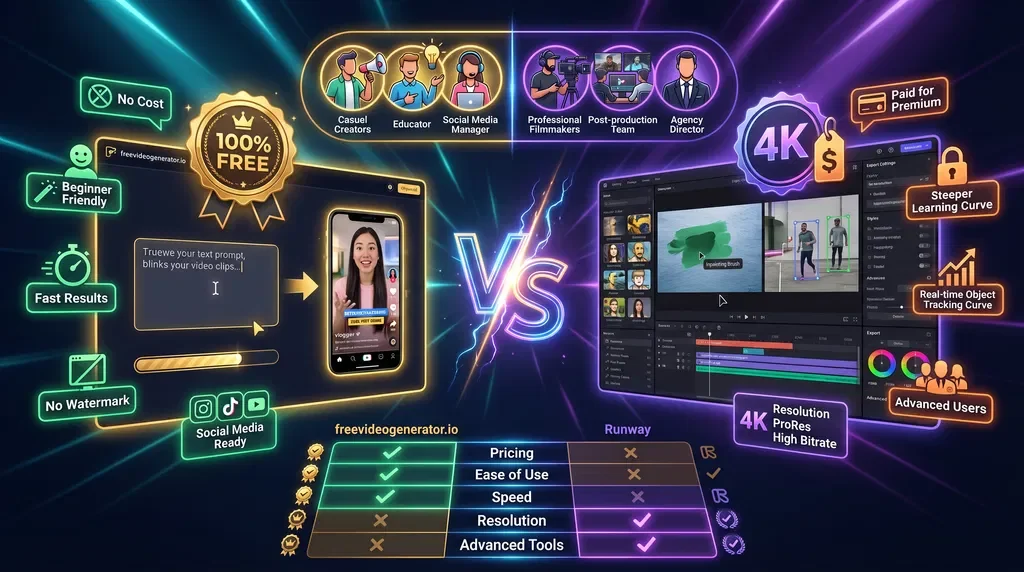
As artificial intelligence continues to revolutionize video creation in 2026, content creators, marketers, and businesses are increasingly looking for powerful AI video tools that simplify production while maintaining high quality. Two popular platforms in this space are Van Gogh Studio and Runway. Both bring innovative AI-driven features to the table, but they serve slightly different audiences and needs.
In this comprehensive comparison, we'll explore the key differences, strengths, and potential limitations of Van Gogh Studio and Runway — helping you determine which AI video tool is the best fit for your projects in 2026.
Van Gogh Studio is a completely free AI video generation platform designed to empower anyone—from beginners to professionals—to create stunning videos effortlessly. Leveraging cutting-edge AI models, it enables users to generate videos quickly using text prompts, template customization, and automated editing.
Runway is a versatile AI-powered video creation and editing suite widely favored by creative professionals. Featuring a range of generative AI tools such as background removal, style transfer, and text-to-video generation, Runway offers both free and subscription plans, catering to more advanced editing and collaboration workflows.
In 2026, accessibility remains a paramount consideration. Here, Van Gogh Studio stands out by being completely free with no hidden charges. This makes it an ideal option for content creators who want to experiment or produce videos without a financial commitment.
Runway offers free usage but limits access to advanced features and higher output resolutions behind paid tiers. While this suits professional users needing premium capabilities, it may not appeal to casual users or those on a tight budget.
Both platforms utilize AI to simplify video creation, but their approaches differ.
Van Gogh Studio focuses on ease by offering text-to-video generation supported by curated templates that speed up production. This approach enables quick, quality video content perfect for social media, marketing, or education.
Runway provides a broader suite of AI tools such as inpainting, real-time object tracking, and style transfer alongside text-to-video. This makes Runway powerful for creative experimentation and professional-grade productions but potentially overwhelming for beginners.
Van Gogh Studio prides itself on a streamlined, intuitive interface optimized for users with any level of video editing experience. You can create engaging videos quickly without needing to navigate complex menus or training.
Conversely, Runway's interface, while modern and feature-rich, targets users comfortable with video editing software. Its multiple advanced options may require a steeper learning curve.
In 2026, high-quality video remains non-negotiable.
Van Gogh Studio currently supports output up to Full HD (1080p), adequate for the majority of online platforms including YouTube, Instagram, and TikTok.
Runway supports export at resolutions up to 4K, benefiting filmmakers and companies requiring ultra high-definition videos.
For most users, Van Gogh Studio's video quality hits the sweet spot between quality and ease.
Runway shines in scenarios where teams collaborate closely with tools for shared projects, live commenting, and workflow management.
Van Gogh Studio, while primarily designed for individual creators, offers basic sharing options and is continuously evolving to support collaborative features—keeping simplicity at its core.
Whether you need marketing videos, educational content, or simple visual stories, Van Gogh Studio offers a compelling solution without the barrier of cost or complexity.
If you require powerful AI editing tools, 4K exports, or advanced collaborations with teams, Runway may be a better match. It's well-suited for:
Both Van Gogh Studio and Runway bring impressive AI-powered video capabilities in 2026, targeting different audiences and needs.
For creators seeking a free, simple, and fast AI video tool, Van Gogh Studio is the standout choice. Its zero cost, ease of use, and quality output make it an excellent starting point and ongoing platform for video content creation.
Meanwhile, Runway caters to professionals requiring advanced features, higher resolution, and collaboration, but comes at a price and complexity trade-off.
With AI video creation shaping the future of content production, embracing the right tool can unlock your creative potential. Visit Van Gogh Studio today to explore a powerful, free solution designed to help you make remarkable videos effortlessly.
An in-depth comparison between Fotor AI Video Generator and Van Gogh Studio.
Leer artículoComparación de freevideogenerator.io y Pictory: interfaz, fortalezas, precios y casos de uso en 2026.
Leer artículoComparación 2026 entre freevideogenerator.io y Canva Video: facilidad de uso, calidad, IA, precios e integración para elegir la mejor herramienta gratuita de video con IA.
Leer artículoHerramientas de inteligencia artificial gratuitas para pasar de la idea a la publicación: elija una herramienta y comience a crear en minutos.

Define dos fotogramas clave — la IA rellena la transición.
Convierte imágenes en video cinematográfico
Abrir
Escala a HD o impresión
Abrir
Extiende clips con IA
Abrir
Mezcla MP3/WAV/M4A con tu clip, silencia el original (opcional)
Añade música o voz en off
Abrir
Genera subtítulos para tus vídeos automáticamente
Añade subtítulos para redes sociales
Abrir
Extraiga un marco, agregue texto, exporte tamaños YouTube
Diseña una miniatura atractiva
Abrir| Feature | Van Gogh Studio | Runway |
|---|
| Pricing | 100% Free | Free tier + Paid plans |
| AI Video Generation | Text-to-video with templates | Text-to-video + advanced tools |
| Editing Tools | Basic customization & trimming | Comprehensive video editing suite |
| Collaboration | Limited | Advanced team collaboration |
| Ease of Use | Beginner-friendly | Moderate to advanced learning curve |
| Output Resolution | Up to Full HD | Up to 4K |
| Supported Platforms | Web-based | Web and desktop apps |
| Customer Support | Community & Email support | Priority support on paid plans |